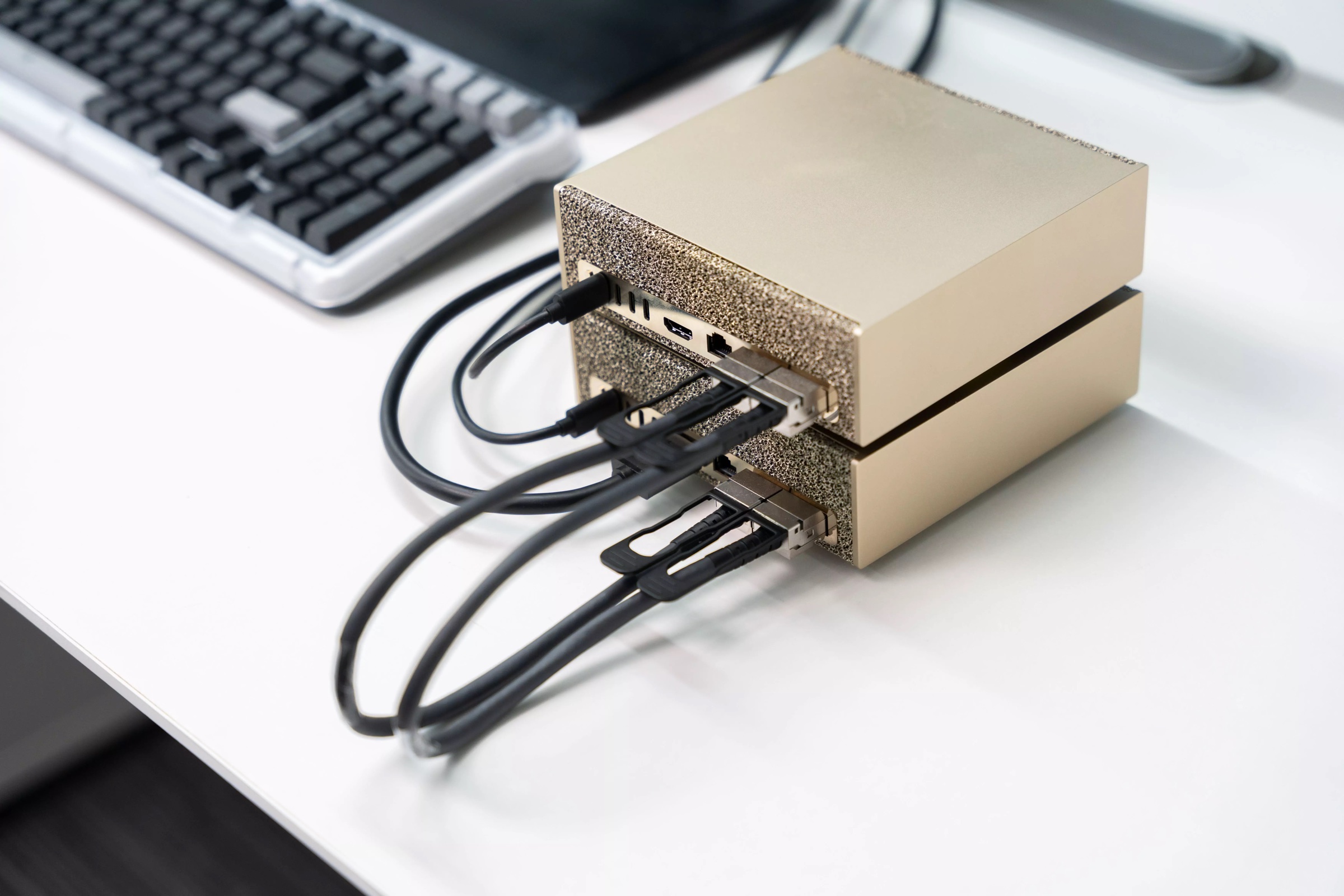
Two NVIDIA DGX Spark units stacked on a desk, linked by two QSFP cables, with a keyboard behind them.

Local AI for
Type Design

with the Runebender Font Editor

Eli Heuer · ATypI 2026 Sharjah

Runebender is an open-source, cross-platform font editor written in Rust. It runs, trains, and fine-tunes models on your own machine.

Setup instructions are at runebender.org/docs/local-ai-setup.html. The exercises are in the runebender-local-ai-demo repository.

01 Introduction

Local AI for Type Design

Format

A short demo, then hands-on setup on your own machine.

  1. Demo: training, fine-tuning, open models, nodes
  2. Setup: a DMG, Cargo, or a coding agent
  3. Exercises: five folders in the demo repository

Bring a Mac with Apple silicon or a Linux PC. Windows desktop support is not ready.

Setup routes: a DMG on a Mac, Cargo on Mac and Linux, or a coding agent pointed at runebender.org.

01 Introduction

Local AI for Type Design

Runebender

A free, open-source font editor written in Rust.

  1. Built onLinebender crates
  2. SourcesUFO, Designspace
  3. Runs onmacOS, Linux, browser
  4. LicenseApache 2.0 or MIT
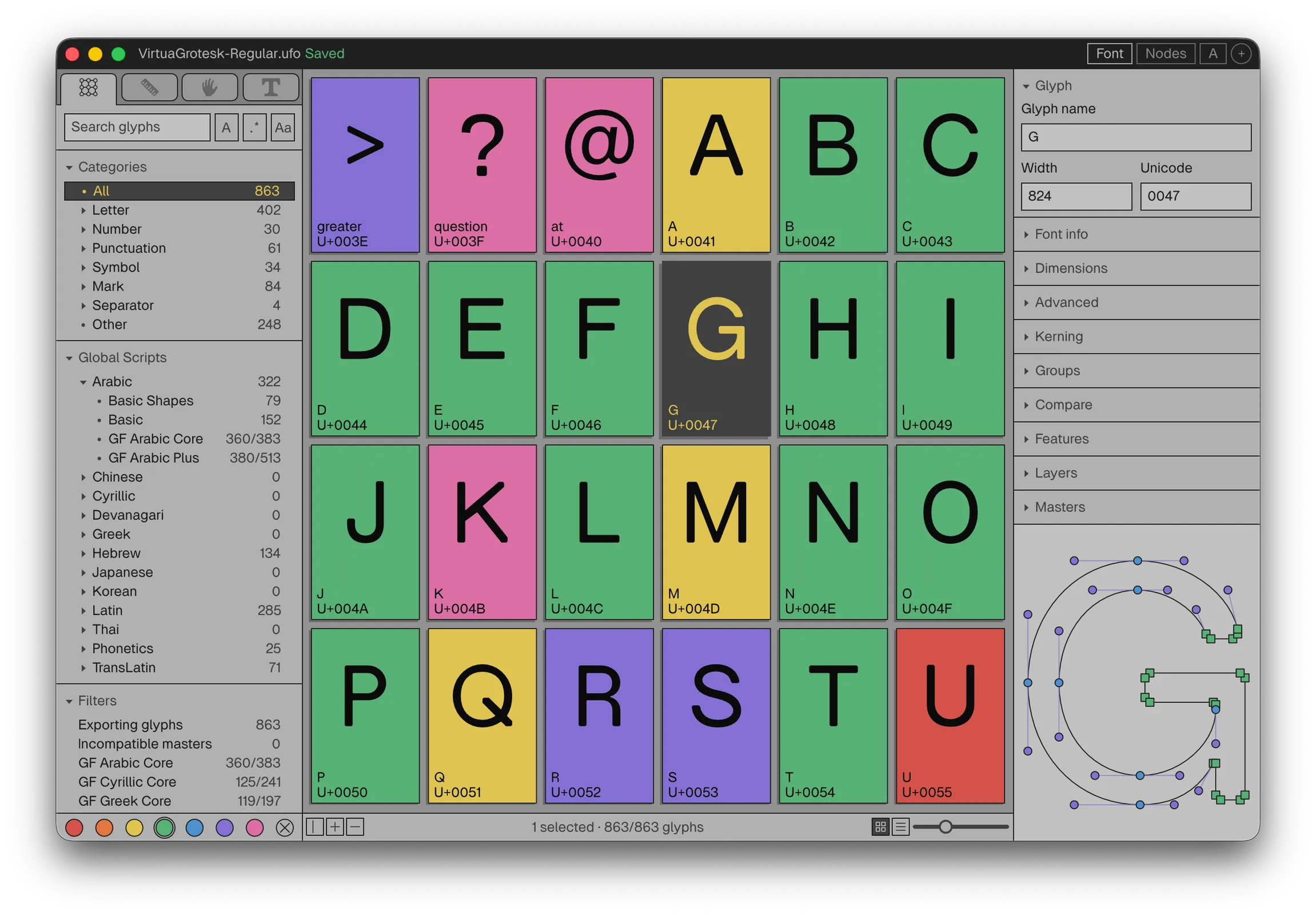
Runebender’s glyph overview for Virtua Grotesk, with color-graded glyph cells and a glyph preview.

Runebender is a cross-platform font editor built on the Linebender ecosystem of Rust crates. The desktop app runs on macOS and Linux; an experimental WebAssembly version runs in the browser.

UFO and Designspace are the main editable formats. It also opens Glyphs and Fontra sources with basic alpha support, and imports compiled TTF and OTF fonts.

It includes Graph, a node editor similar to ComfyUI, the Chat panel for local models, and an MCP server for coding agents.

01 Introduction

Local AI for Type Design

Written in Rust

One language from the curve math to the window to the models.

  1. InterfaceXilem, Masonry
  2. Curves, UFOkurbo, norad
  3. Compiling, shapingfontc, HarfRust
  4. Modelsfont-ml, Candle
  5. Browsersame code, WebAssembly

The editor is about 178,000 lines of Rust. Python appears only in release scripts and in optional recipes, which talk to the editor through JSON.

Xilem and Masonry are the Linebender interface libraries; kurbo is Linebender’s curve library. norad reads and writes UFO. fontc is Google’s font compiler written in Rust, and HarfRust is the Rust port of HarfBuzz. The fontations crates read and write font files.

Rust gives one fast native binary with no runtime to install, memory safety checked by the compiler, and the same code compiled to WebAssembly for the browser. The model runtime, font-ml, is Rust too, built on Hugging Face’s Candle.

External helpers, such as llama-server, are separate programs and are not part of the editor’s code.

01 Introduction

Local AI for Type Design

The RoboFont tradition

A starting point for designers who build their own tools.

RoboFont design principles, robofont.com

  1. The designer decidesno automatic changes
  2. Own your toolsscripts, extensions
  3. Runebender’s toolsrecipes, nodes, agents
  4. Build from sourcechange anything

RoboFont, by Frederik Berlaen, is a UFO font editor written in Python and built to be extended. Its design principles say: “The typeface designer should make the decisions and have the power to design their fonts,” and the application “shouldn’t make autonomous decisions.” Also: “Not being (partly) the designer of your own tools puts a designer in a vulnerable position.”

Runebender follows the same idea. It is meant as a base for people who customize their tools: Python recipes, node graphs, the MCP connection for agents, and the source itself. Machine output is always a proposal the designer installs, which is the same rule as no automatic changes.

01 Introduction

Local AI for Type Design

How it differs

Open source, cross-platform, and built for local AI from the start.

  1. Open sourceApache 2.0 or MIT
  2. Cross-platformmacOS, Linux, browser
  3. Local modelstrain and run in the editor
  4. Agentslive MCP connection
  5. Machine outputalways a proposal

For comparison: Glyphs runs on macOS only and is commercial. FontLab is commercial and runs on macOS and Windows. RoboFont is commercial, macOS only, and scripted in Python. FontForge is open source and long-established. Fontra is open source and runs in the browser. Runebender’s difference is the combination: a permissive open-source license, native and browser versions from one Rust codebase, and local AI and agents built into the editor’s design rather than added later.

Runebender is alpha software. The established editors are far more complete; this is a base to build on, not a replacement today.

01 Introduction

Local AI for Type Design

First public alpha

The first public release: a signed, notarized DMG for Apple silicon Macs.

  1. Version0.1.0-alpha.1
  2. ReleasedOctober 28, 2026
  3. PlatformApple silicon, macOS 12+
  4. Downloadrunebender.org
  5. Not yet testedsave and reopen, updates

Runebender 0.1.0-alpha.1 is published as a GitHub prerelease and linked from runebender.org. The DMG is signed with a Developer ID, notarized by Apple, and stapled. Its SHA-256 is 2818eb2d02e9ee920020510675ad43ca175608b3e09115ce9e1f3d4773a73622.

Download: github.com/fontgarden/runebender/releases/tag/v0.1.0-alpha.1

This is an alpha. A manual save-and-reopen regression test, a full two-version update install, and older macOS versions have not been tested yet. They are on the checklist for alpha.2. The app includes an updater (Check for Updates).

Intel Macs and Linux build from source. There is no Windows installer.

01 Introduction

Local AI for Type Design

Open questions

Who controls the tools, the data, and the models?

  1. Who owns a model trained on a designer’s drawings?
  2. Can a font license allow or forbid use as training data?
  3. Should unreleased client fonts go to a cloud service?
  4. Which glyphs should a model draft, and which must a person draw?

These questions frame the workshop. Running models locally answers some of them directly: the drawings, the training data, and the model files stay on the designer’s machine.

Custom type for clients is often under a non-disclosure agreement. Sending unreleased glyphs to a cloud model can break that agreement. A local model does not send anything.

Most font licenses were written before model training. The SIL Open Font License does not mention it. Commercial EULAs differ by foundry.

The structure follows Nathan Lambert’s lecture “Open Language Models” (Harvard, October 2026), which opens with three questions about who should control the technology.

02 Open models

Local AI for Type Design

Why local AI

One AI company serving every studio would control the type industry.

  1. Independence from any one company
  2. Drawings, models, and fonts stay yours
  3. Client work stays on your machine
  4. No fee for each use
  5. Models you can open and study
  6. A model on disk keeps working

The core reason is concentration of power. A company that runs the models for every studio sees every studio’s drawings and requests, sets the prices, can change the terms or close access, and can release its own fonts and font tools. With local models, no single company stands between the type industry and its own tools.

Ownership: a foundry owns its fonts; with local models it also owns the models trained on them. Lambert’s example from another industry: in August 2026, Harvey post-trained an open Kimi K3 base model so law firms can own their models.

Confidentiality: custom type for clients is often under a non-disclosure agreement. A local model sends nothing.

Cost: no per-token fee. Understanding: a model that can be opened, trained, and studied, which is how a field learns how a technology works.

Durability: a model file on disk runs as long as the hardware does. A cloud model can be retired, repriced, or changed by its provider. Mark Zuckerberg’s list of what developers want from open models covers the same ground: train, fine-tune, and distill their own models; “control our own destiny and not get locked into a closed vendor”; protect their data; run at lower cost; and build on the ecosystem that will last. (Open Source AI is the Path Forward, July 2024.)

Lambert’s general list of reasons people want open models: commoditizing complements, scientific progress, preventing concentration of power, and freedom. (Open Language Models, Harvard, October 2026.)

02 Open models

Local AI for Type Design

Protecting know-how

A foundry that works through an AI lab teaches that lab how fonts are made.

  1. Your processsent to the lab
  2. Consumer chatsused, by default
  3. Business plansnot used, for now
  4. Labs enter marketsClaude Design
  5. Firms train their ownHarvey, 2026

The real leak is not data, it is know-how: the methods and judgment that make one business different from another. A company that runs its core work through someone else’s model passes that know-how to the model’s owner, a little at a time, even when nobody intends it. Control of your own compute, models, and data is a form of independence. Keep the data in-house, run your own models, and keep a layer you control between the model and your work.

For a type studio, the know-how is the process: how it draws, spaces, kerns, and corrects, and the judgment in every correction. A studio that does this work through a frontier lab’s chat or agent sends that process to the lab. If every small foundry did so, the lab would hold the industry’s combined method, and could release its own fonts.

Precedent: in July 2026, David Sacks said Anthropic “blindsided” Figma by launching Claude Design, a competing design tool, while an Anthropic executive had served on Figma’s board. That is Sacks’s account.

Terms, to be fair: since September 2025, Anthropic trains on consumer chats (Free, Pro, Max) unless the user opts out. Commercial and API use is not used for training under current terms. Training is not the only route for know-how to leave: a lab sees what its customers work on, and terms can change.

The alternative is ownership. In August 2026, Harvey post-trained an open Kimi K3 base model so law firms can own their models. Mercor and SkyRL post-trained an open Qwen3.5 model on expert data and released the weights. A foundry can do the same with local models trained on its own drawings.

02 Open models

Local AI for Type Design

Open formats

Type has seen this before: closed formats gave way to open ones.

Zuckerberg, Open Source AI is the Path Forward, 2024

  1. PostScript Type 1support ended 2023
  2. OpenTypean ISO standard
  3. UFOopen source format
  4. Unix to Linuxthe same pattern

Zuckerberg’s argument starts with Unix: each large company built its own closed version, and open source Linux replaced them, first because it was cheaper and could be modified, later because it was better and had a larger ecosystem. He expects AI to follow the same path.

Type went through the same change. PostScript Type 1 was Adobe’s closed format; Adobe ended Type 1 support in new releases of its apps in January 2023. OpenType, an open specification from Adobe and Microsoft, is published as an ISO standard (Open Font Format). UFO is an open source format that most font editors read and write, and Runebender uses it.

The same choice is coming for the models in type design tools: closed models behind an API, or open models in a format anyone can run.

02 Open models

Local AI for Type Design

What is open?

Open weights

Released to download and run. Like a font binary.

  1. AlibabaQwen
  2. GoogleGemma
  3. OpenAIgpt-oss
  4. DeepSeekV3, R1

Open source

Weights, data, and code. Like font sources.

  1. EleutherAIPythia
  2. Ai2OLMo, Tülu
  3. Hugging FaceSmolLM
  4. MarinMarin

After Nathan Lambert, Open Language Models, 2026

Open weights are like a compiled font: you can use it, but you cannot see how it was made. Open source is like a font released with its UFO or Glyphs sources and build scripts: you can study it, change it, and rebuild it.

Both differ from Claude and GPT, which are available only through an API. Openness is a spectrum (Solaiman, 2023): NVIDIA Nemotron releases much of its training data, but not all.

Moonshot AI (Kimi) and Zhipu (GLM) are also leading open-weight labs. Meta’s Llama and Muse models are open weights under custom licenses. Marin is from the Marin community and Open Athena.

The Runebender font models are open in the full sense: the training data is the designer’s own font sources, and font-ml is open source.

02 Open models

Local AI for Type Design

How close open models are

The best open models trail the best closed models by a few months.

Artificial Analysis and Epoch AI, via Nathan Lambert, October 2026

  1. General intelligence indexabout 3 months
  2. Software engineeringabout 5 months
  3. The gap is getting smaller

The leading open models in October 2026 come from Chinese labs: Xiaomi MiMo-V2.6-Pro, DeepSeek V4.1 Flash, GLM-5.3. American open models trail by another 3 to 4 months.

These leading models have about 1 trillion parameters and do not run on a laptop. The models in this workshop are much smaller. The point is that open weights are not a second-rate category.

02 Open models

Local AI for Type Design

Chinese open models

Most leading open models now come from Chinese labs.

After Nathan Lambert, Open Language Models, 2026

  1. Older labs want impactGLM, since 2021
  2. Startups want adoptionKimi
  3. DeepSeek R1 drew new labsJanuary 2025
  4. Run locally, nothing is sentany origin

Lambert’s reasons: Chinese labs wanted their work to matter, and many had built models for years; Zhipu released its first open GLM model in 2021. Newer startups such as Moonshot AI chose open weights to gain adoption for Kimi. There was also urgency to be taken seriously in the Western AI discussion. DeepSeek R1, released in January 2025, drew new entrants: Ant Group, Meituan, and Xiaomi.

The Qwen models in Runebender’s chat catalog are from Alibaba. Gemma is from Google and gpt-oss is from OpenAI.

For a type studio, the origin of an open model matters less when it runs locally. The weights are files on your disk. Nothing you type or draw is sent to the lab that made them. The license and the model’s behavior still matter, so test a model on your own work before you rely on it.

02 Open models

Local AI for Type Design

Distillation

Training a model on the output of another model.

After Nathan Lambert, Open Language Models, 2026

  1. Teacher and student modelsHinton, 2015
  2. Training on any model’s output
  3. Extracting output from a closed API

Three meanings. The first is the original technique: a student model learns the full output distribution of a teacher. The second is post-training on outputs of any model, which covers most synthetic data. The third, the current debate, is taking hidden reasoning traces from closed APIs; Lambert calls it adversarial distillation.

Nasta’liq Distilled is the first meaning: a neural font trained on the shaped output of Gulzar, an OFL font.

The font-industry version of the debate is training on other foundries’ fonts. The Runebender models train only on the designer’s own drawings.

02 Open models

Local AI for Type Design

Google Fonts

Most fonts were never built as training data.

From elih.net/blog/virtua-grotesk

  1. Points land anywhere, not on a grid
  2. Each family has its own conventions
  3. Normalizing them removes information
  4. Fonts made from them stay under the OFL

Many font AI projects train on scraped fonts and Google Fonts, which differ in every dimension that matters. The coordinates land wherever each designer put them, and the contours are as individual as handwriting.

A model trained on that mix spends its capacity reconciling different drawing habits instead of learning one design. Preprocessing to normalize or quantize the fonts removes information, and mixed sources add variation unrelated to the target design.

Simon Cozens notes that “vectorization of glyph images has been historically very bad,” and his own experiment with Google Fonts “completely failed.” (State of AI font generation, June 2026.)

Licensing: the Google Fonts catalog is mostly OFL. Under OFL-FAQ 1.25, a font produced by a model trained on OFL sources is a derivative and must stay under the OFL.

Virtua-12M-v0.1 was pretrained on 28,770 Regular and Bold pairs traced from Google Fonts, then fine-tuned on Virtua Grotesk. The corrected corpus drops the Google Fonts stage and trains on Virtua Grotesk alone.

02 Open models

Local AI for Type Design

A better open library

With AI, an open font library can meet one high standard.

After Bill Gurley, Open Source Strategy, May 2026

  1. Google Fonts made web fonts free
  2. Its quality and conventions vary
  3. Local models draft, designers grade
  4. Every font is also clean training data

Gurley describes open source as a corporate strategy: companies use it “to neutralize a stronger competitor, commoditize an expensive input, align an industry around a shared standard, or head off a regulatory crisis.” His examples include Android against the iPhone, Kubernetes against AWS, RISC-V against per-unit chip licensing, and Overture Maps against Google’s map data.

Gurley does not discuss fonts. My reading: Google Fonts fits his pattern. Free, open fonts commoditized an input to the web, Docs, and Android, which are Google’s businesses. It succeeded, and the fonts are free and widely used, but the families were drawn by many designers to many standards, and quality varies.

AI changes the cost. A small team can draw a core set by hand, let local models draft the rest in the same conventions, and grade every glyph. The result can be an open library held to one standard, where every font is also usable training data, because it was drawn as a system from the start. Virtua Grotesk is the first test of that approach.

02 Open models

Local AI for Type Design

Expert data

Harvey, legal work

Law firms can own their models.

  1. Base modelKimi K3, open
  2. Datapublic and expert
  3. Held-out tasksnearly 2×

Mercor, knowledge work

Weights and script released.

  1. Base modelQwen3.5 397B, open
  2. Dataabout 2,000 tasks
  3. Score16.1% to 27.3%

Harvey, August 2026; Mercor and SkyRL, September 2026

The pattern: take an open-weight base model, train it on an industry’s expert data, and own the result.

Harvey Tenet (research preview, August 20, 2026): a Kimi K3 base post-trained with Fireworks using reinforcement learning on synthetic, public legal, and human expert data. Harvey says no customer data was used. It reports nearly twice as many held-out Legal Agent Benchmark tasks completed as the base model, at a stable cost. These are Harvey’s own evaluations, and the weights are not released.

Mercor and SkyRL (September 2026): in January, fewer than 1,000 expert-labeled tasks nearly doubled an open model’s score on APEX-Agents. The first full run post-trained Qwen3.6-35B-A3B, the same model I use every day for chat and coding. The 397B run raised Pass@1 on 480 tasks from 16.11% to 27.29%. They released the weights, the training script, and the evaluation traces.

Lambert calls this an economic engine for ownership and cost savings. (Open Language Models, Harvard, October 2026.)

02 Open models

Local AI for Type Design

For type design

An open model plus a foundry’s graded glyphs is a model the foundry owns.

  1. Base modelopen weights
  2. Expert datagraded glyphs
  3. Trainingfine-tune, adapter
  4. Measureheld-out pairs
  5. Resultyour own model

A foundry’s expert data is its drawings and its corrections: every glyph graded green, and every draft the designer fixed. That is the type equivalent of Harvey’s legal expertise and Mercor’s expert tasks.

Small amounts of expert data go far. Mercor nearly doubled an open model’s score with fewer than 1,000 expert tasks. The first Virtua Grotesk model was fine-tuned on 50 graded Bold pairs.

Measuring matters as much as training. Harvey and Mercor report scores on held-out tasks. Runebender scores each engine on held-out drawn pairs against a mean-shift baseline.

02 Open models

Local AI for Type Design

Where to start

Local AI is the place to learn how this works.

  1. Run an open model on your machine
  2. Train a small model on your drawings
  3. Fine-tune it and measure the result
  4. Scale up on rented GPUs when needed

This workshop covers the first three steps. They run on a laptop and need no account.

The same steps scale. Harvey and Mercor ran the same kind of post-training on much larger open models with rented compute. The skills are the same: prepare expert data, train, and measure on held-out work.

Many industries could do this, and type design is one. I plan to do it with my own company.

02 Open models

Local AI for Type Design

Licenses

Models

The models Runebender uses are permissive.

  1. Qwen3.5 4BApache 2.0
  2. Qwen3.6 27B, 35B A3BApache 2.0
  3. Gemma 4 26B A4BApache 2.0
  4. gpt-oss 20BApache 2.0
  5. Whisper smallMIT

Software

The programs that run them are permissive too.

  1. llama.cppMIT
  2. whisper.cppMIT
  3. Runebender, font-mlApache 2.0 or MIT
  4. Models trained on your fontsnot defined

From the model files and project licenses, October 2026

Permissive licenses (MIT, Apache 2.0) allow use, modification, sale, and redistribution, as long as the notice is kept. They work like the SIL Open Font License, without its Reserved Font Name clause.

Custom model licenses add conditions and are not open-source licenses: revenue limits (Kimi K3 and Muse Spark Open above $20M for inference services), branding (“Built with Llama”, like a Reserved Font Name), and acceptable-use policies (Llama, Gemma 1 to 3). Gemma 4 moved to Apache 2.0. Most of these terms have not been tested in court. (Nathan Lambert, Open Language Models, Harvard, October 2026.)

The chat models are 4-bit GGUF conversions published by Unsloth. The conversion keeps the original license.

No license says what a model trained on a font inherits from the font. A model trained on an OFL font, such as the Virtua Grotesk models, is an open question. The Shapes font in the demo repository is Apache 2.0 or MIT.

02 Open models

Local AI for Type Design

Training on fonts

A model trained on an OFL font: what carries over?

SIL OFL-FAQ 1.25 and 1.26, November 2023

  1. Fonts it draftsderivative, stays OFL
  2. Graphics it makesnormal use
  3. The model weightsnot addressed

FAQ 1.25: “Any font produced from such systems whose input or training data contains any source file from a font project licensed under the OFL should be considered a derivative work.” It must remain under the OFL. To release it under another license, ask the authors for permission.

FAQ 1.26: OFL fonts can be used by AI-based design tools “as long as the resulting work is not intended to be a font.” Graphical output is “similar to normal usage.”

Neither the license nor the FAQ says whether the trained weights are themselves Font Software or a Modified Version. That is the open question.

The FAQ is SIL’s interpretation, not a court ruling.

02 Open models

Local AI for Type Design

Font licenses

SIL Open Font License

Font output stays under the OFL.

  1. Condition 5OFL only
  2. Modified Versionincludes new formats
  3. FAQ 1.25model fonts derivative
  4. FAQ 1.26graphics are normal use

Foundry licenses

Many now forbid AI training.

  1. Monotypeno training on glyphs
  2. Commercial Typeno AI use
  3. Ama, BALno training data
  4. Older licensessilent

License texts and EULAs as published, October 2026

OFL condition 5: “The Font Software, modified or unmodified, in part or in whole, must be distributed entirely under this license, and must not be distributed under any other license.” A Modified Version is “any derivative made by adding to, deleting, or substituting, in part or in whole, any of the components of the Original Version, by changing formats or by porting the Font Software to a new environment.” Documents created with the font are exempt.

Monotype’s MyFonts EULAs forbid using the font software, rendered glyphs, outlines, or kerning data to develop, train, or fine-tune AI models; metadata such as names and classification tags is allowed. Ama Foundry’s clause also covers output that mimics the design. BAL Foundry forbids dataset inclusion and automated analysis. Commercial Type forbids use with AI services and AI programming.

Most EULAs were written before AI design tools. Check each foundry’s current text; these clauses change.

02 Open models

Local AI for Type Design

Copyright

In the US, the font file is protected. The letterforms are not.

Adobe v. Southern Software, 1998

  1. Font softwarecopyright
  2. Typeface designnot copyrightable
  3. Novel designsdesign patent
  4. Font namestrademark

I live and work in the United States, so this deck uses US law. I work up to the limit of what US law allows, and stay within it.

The US Copyright Office treats typefaces as variations of letters, which cannot be owned. Font software is protected as a computer program. In Adobe v. Southern Software, the court found infringement in copied font software, not in the letterforms.

This matters for training: a model learns from outlines, which are part of the font software, but it may output only letterforms. Whether the weights copy the software is not settled.

Other countries differ. The UK and Germany give typeface designs some protection. Verify the details before presenting.

02 Open models

Local AI for Type Design

Open question

What license should a model trained on a font carry?

  1. Are the weights a Modified Version?
  2. Is shipping the model shipping the font?
  3. Does redrawing the font matter?
  4. What should Runebender recommend?

Planned

To be answered. Research notes: ~/Desktop/Model-License-Research.md.

Cases to work through: a model trained only on the designer’s own fonts (Virtua Grotesk, which is OFL, and the Shapes font, which is Apache 2.0 or MIT); a model trained on another designer’s OFL font (Nasta’liq Distilled used Gulzar); a model trained on a commercial font under a EULA that forbids training.

03 Concepts

Local AI for Type Design

Small models

Font models are small enough to train on a laptop.

  1. One to a few dozen megabytes
  2. Minutes to train on a laptop GPU
  3. Trained only on your own drawings
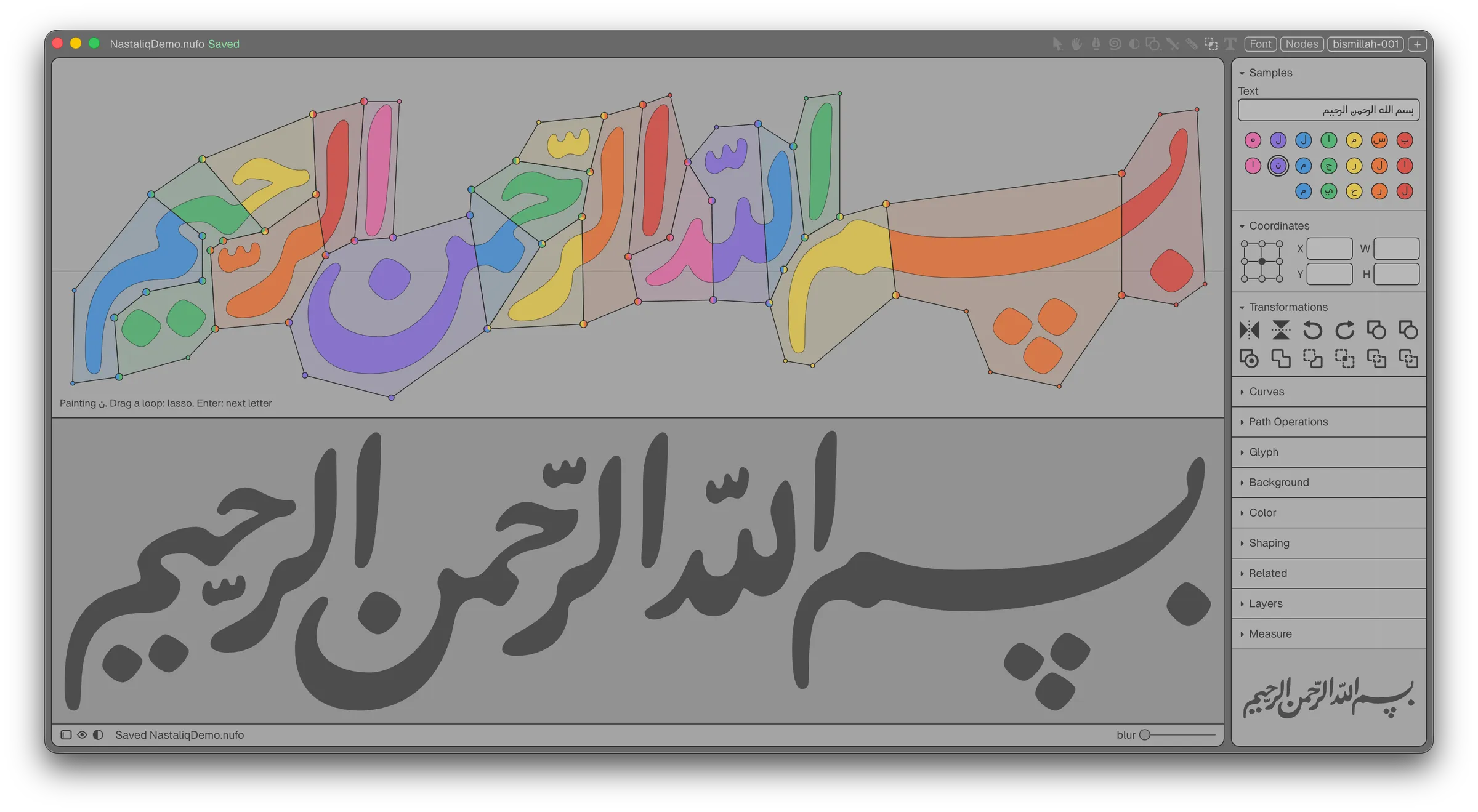
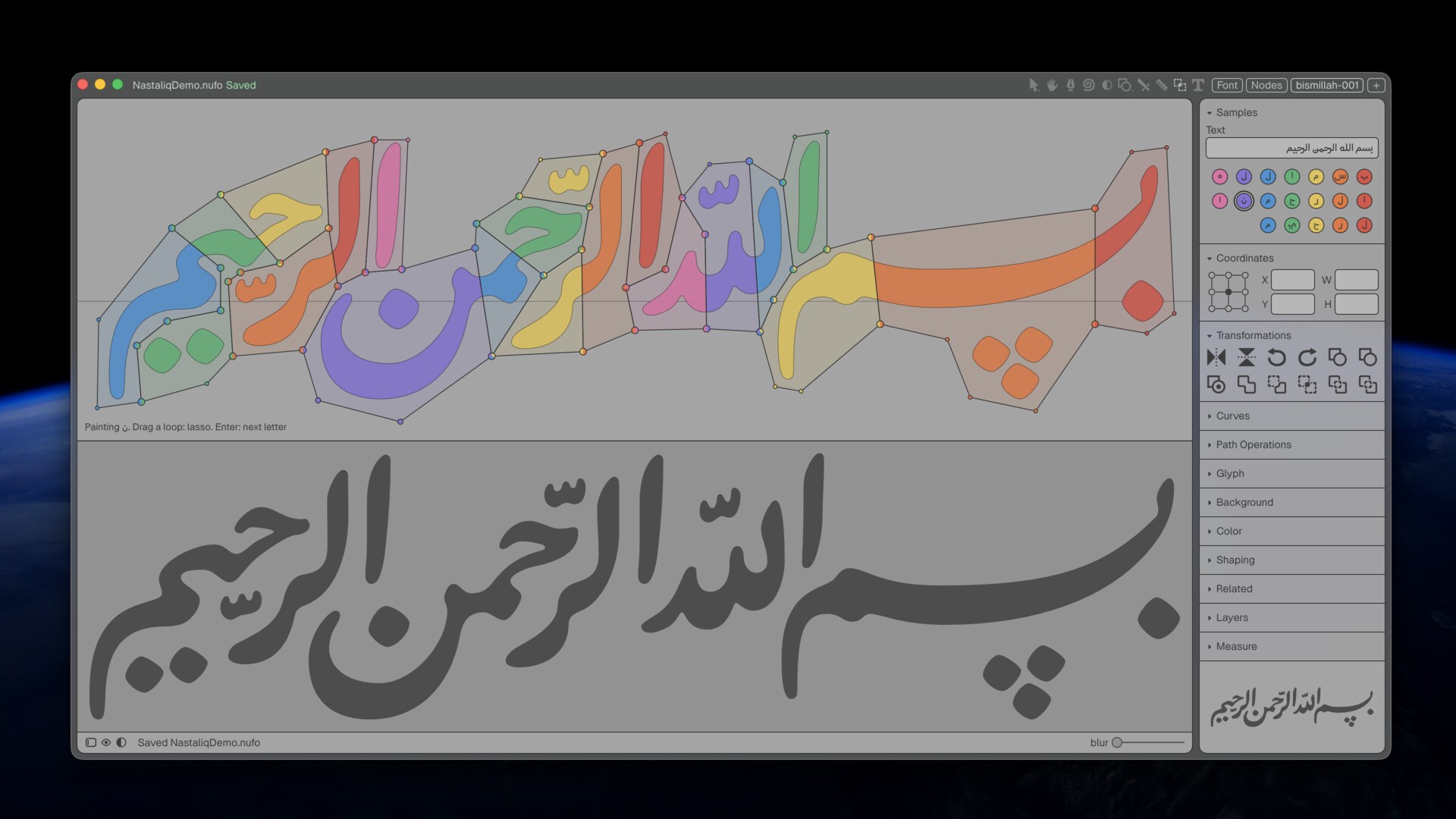
Runebender editing Arabic glyphs with a rendered preview.

A PC with a good graphics card can train larger models. The font models are one to a few dozen megabytes. Training one from scratch takes minutes on a laptop GPU.

Most font generation research trains on large collections of scraped fonts, which mix many drawing conventions. These models train on the designer’s own drawings, made on one grid.
03 Concepts

Local AI for Type Design

Models are folders

A model is a folder in ~/Runebender/models.

  1. Chat modelmodels/qwen3.5-4b/
  2. Shapes modelmodels/shapes/
  3. Bolden modelmodels/bolden/
  4. A font’s own modelsMyFont.models/

A chat model is a folder directly under ~/Runebender/models that holds a .gguf file, for example ~/Runebender/models/qwen3.5-4b/model.gguf. The folder name is the model name. An optional model.json holds its settings. A Runebender model (shapes, bolden) holds a config, the weights, a vocabulary, and sometimes a manifest; it sits directly under the models folder or one level down in shapes/ or bolden/.

The editor also reads the older ~/.runebender/models and any extra folders listed in ~/.runebender/model_paths. RUNEBENDER_MODELS sets a different root.

A font’s own models are in MyFont.models/ beside it, so they move with the font. The editor reads only these files. RUNEBENDER_MODELS sets a different root for one run.

03 Concepts

Local AI for Type Design

The training loop

Your corrections become new training data.

  1. Draw a core set and grade it green
  2. Train on the green set
  3. The model drafts the rest
  4. Correct the drafts and grade them

Drafts come in batches of 10 to 20 glyphs on the 8-unit grid. Corrected drafts are graded green and join the training set, so each run needs fewer corrections.

Build the font and proof it in text. Name each recurring error and add a check for it before the next run.

03 Concepts

Local AI for Type Design

Drafts are proposals

A model never edits the font directly.

  1. You install or discard each draft
  2. Only a person grades a glyph green
  3. Only you save the font

Machine drafts stay orange until they are graded. Drafts land on the 8-unit grid. The designer makes the 2-unit optical corrections.

Each engine is scored against drawn pairs. The baseline is a plain mean shift. The same rules apply to local models, to agents over MCP, and to the Chat panel.

Runebender with a labeled bismillah and its preview.

04 Demo

Switch to Runebender. Order: open Shapes.ufo, train a shapes model from scratch, add a shape to fine-tune it, bolden octagon and chevron, ask the chat model about the font by voice, run the bolden graph in the Nodes tab, then open Proof and compare a glyph with the reference fonts.

The slides that follow are reference for the same steps. Slides marked Planned describe features that are not finished.

04 Demo

Local AI for Type Design

Training from scratch

Train a model on the shapes in your font.

  1. Choose Local AI Shapes
  2. Train From the Sample Shapes
  3. Drag a box and choose a shape
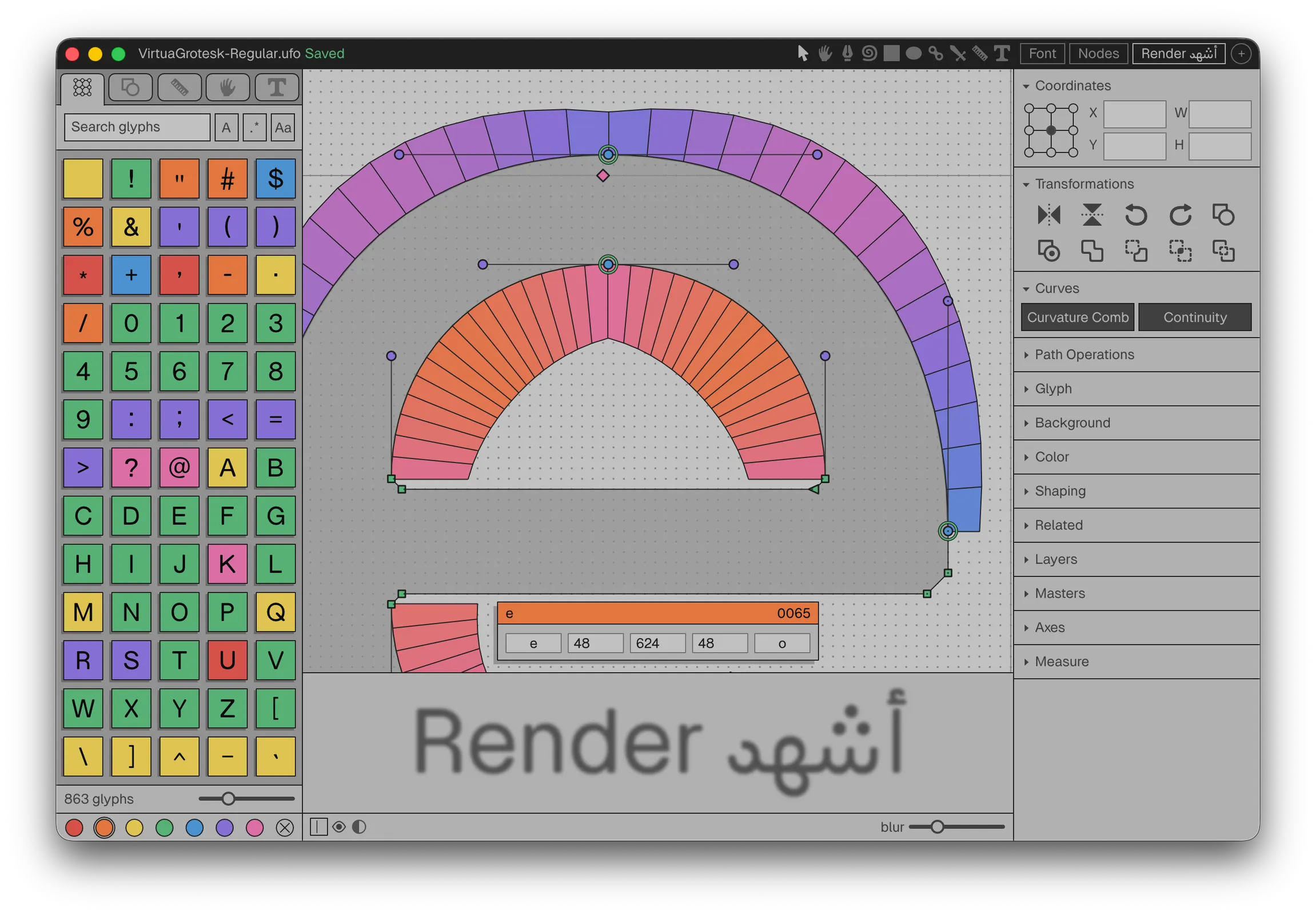
Runebender editing an outline, with the right panel open.

Open a glyph and hold the shapes button to find Local AI Shapes. After training, Enter keeps the preview, Tab draws another, Esc removes it.

The model can draw only the shapes in the training font. Each glyph name is the word for its shape.

A quick training run takes about twelve minutes on a laptop GPU. A thorough run takes about thirty. get-base-model.sh in the demo repository downloads a trained base model with a checksum.

04 Demo

Local AI for Type Design

Fine-tuning

Continue training an existing model with new drawings.

  1. Less data and time than from scratch
  2. In the editor: Add This Font’s Shapes
  3. In font-ml: an adapter over a frozen base

Add This Font’s Shapes continues training from the current model for about two minutes.

A font-ml adapter is a small set of weights in the shape of a LoRA:

font-ml run train --source Regular.ufo --target Bold.ufo --init my-bolden --adapter-out my-adapter --rank 8

font-ml run bolden --model my-bolden --source Regular.ufo --glyph H --adapter my-adapter:1.0

The Nodes tab includes a train-adapter graph that runs the same training.

04 Demo

Local AI for Type Design

Fine-tuning in the editor

A Finetune button trains an adapter on your green glyphs.

  1. Shows when a script has 20 green pairs
  2. Scores the adapter on 5 held-out pairs
  3. Keeps it only if the score is better

Planned

The adapter is saved in MyFont.models/ beside the font. Today the same training runs from font-ml and from the train-adapter graph.

04 Demo

Local AI for Type Design

Bolden

The model drafts the Bold from the Regular.

  1. Same points: the masters interpolate
  2. Batches of 20, marked orange
  3. About half a second per glyph
Runebender’s glyph overview grid for a Latin font.

The Weight debt block lists Bold glyphs that are still identical to Regular. Timing is on Metal.

Measured 2026-10-09 on Virtua Grotesk: Latin 56 drawn pairs, model and offset about even. Arabic 130 pairs, offset better. Hebrew 5 pairs, offset better. Both engines are only slightly better than the mean shift.

An engine needs 20 green pairs on a script, with 5 held out, before its drafts are used.

04 Demo

Local AI for Type Design

Drafting from a sketch

Sketch a glyph. The model redraws it in your font’s style.

  1. Sketch with the brush
  2. Trace the sketch with img2bez
  3. Redraw it with the drawing model
  4. Review the proposal

Planned

The chat model does not draw. The drawing model trains on the glyphs graded green.

The Brush panel already traces temporary ink and can draft with the Virtua sketch model. The first trial, on 2026-09-28, lost the form of the medial kaf. The drawing model is the open work.

04 Demo

Local AI for Type Design

Open-weight chat models

Open models answer questions about the open font.

  1. GGUF files from Hugging Face
  2. Run on your machine by llama.cpp
  3. The tools return the measurements

Small models cannot calculate a stem width from a point list. They do call the correct tools in the correct order, so the tools must return the measurement directly.

Test on Virtua Grotesk, M4 Pro, stem of H. Candle runtime, Qwen3 4B: 543 s, wrong. llama-server, Qwen3 4B: 11 s, wrong. llama-server, Qwen3 8B: 24 s, wrong. llama-server with analyze_glyph, Qwen3 4B: 5 s, correct (100 units).

A 0.6B model gives wrong answers. The Chat panel was built and tested with 4B.

04 Demo

Local AI for Type Design

Model catalog

Choose a chat model and download it with one click.

  1. Qwen3.5 4B2.7 GB
  2. Qwen3.5 9B5.5 GB
  3. Qwen3.6 35B A3B20 GB

Planned

Each entry shows the size, license, and source. The download comes from Hugging Face and is checked against its sha256 checksum. Nothing downloads without the click.

Decided 2026-10-18. All three are Apache 2.0. Machines: 8 GB, 16 GB, and 32 GB or more. A GGUF file placed in a folder under chat/ also works.

04 Demo

Local AI for Type Design

Voice input

Speak a request. A local speech model writes it down.

  1. whisper.cpp runs on your machine
  2. You check the text before sending

The Talk button uses whisper-server (brew install whisper.cpp) and a Whisper model saved as ~/Runebender/models/whisper-small/model.bin. The button is hidden until both are found.

04 Demo

Local AI for Type Design

The node editor

Connect nodes into a workflow, as in ComfyUI.

  1. A workflow is a file
  2. It runs in the editor or the terminal
  3. Results are proposals
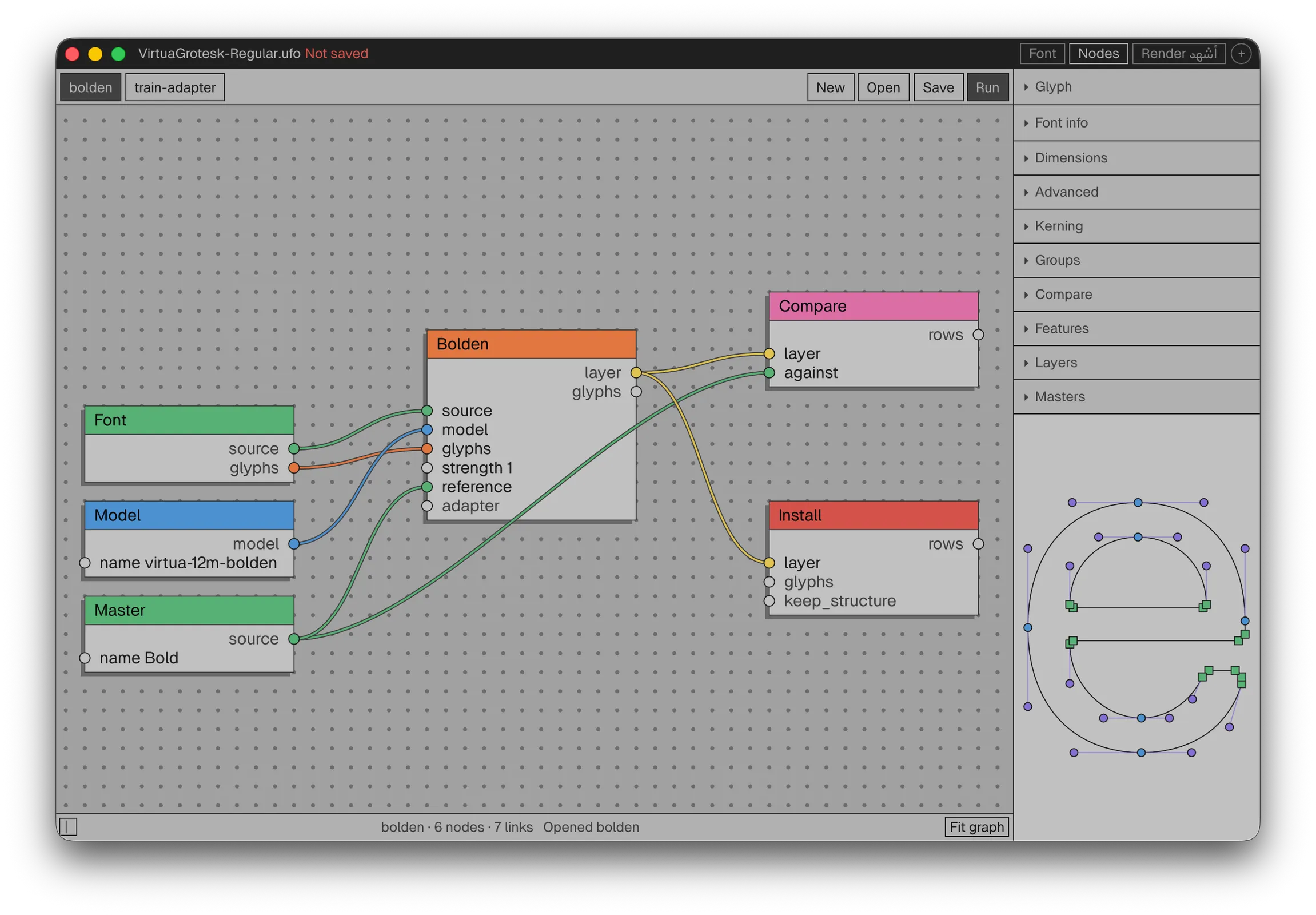
Runebender’s Nodes tab with a workflow graph.

Nodes for the font, a model, a master, and tasks such as Bolden, Compare, and Install. A run does not save or change the open font.

External tasks declare their inputs, so unchanged runs are cached.

04 Demo

Local AI for Type Design

Proof review

Compare a glyph with its earlier state and with reference fonts.

  1. Compare, Toggleone glyph
  2. Waterfall, Textshaped text
  3. Referencesyour own fonts
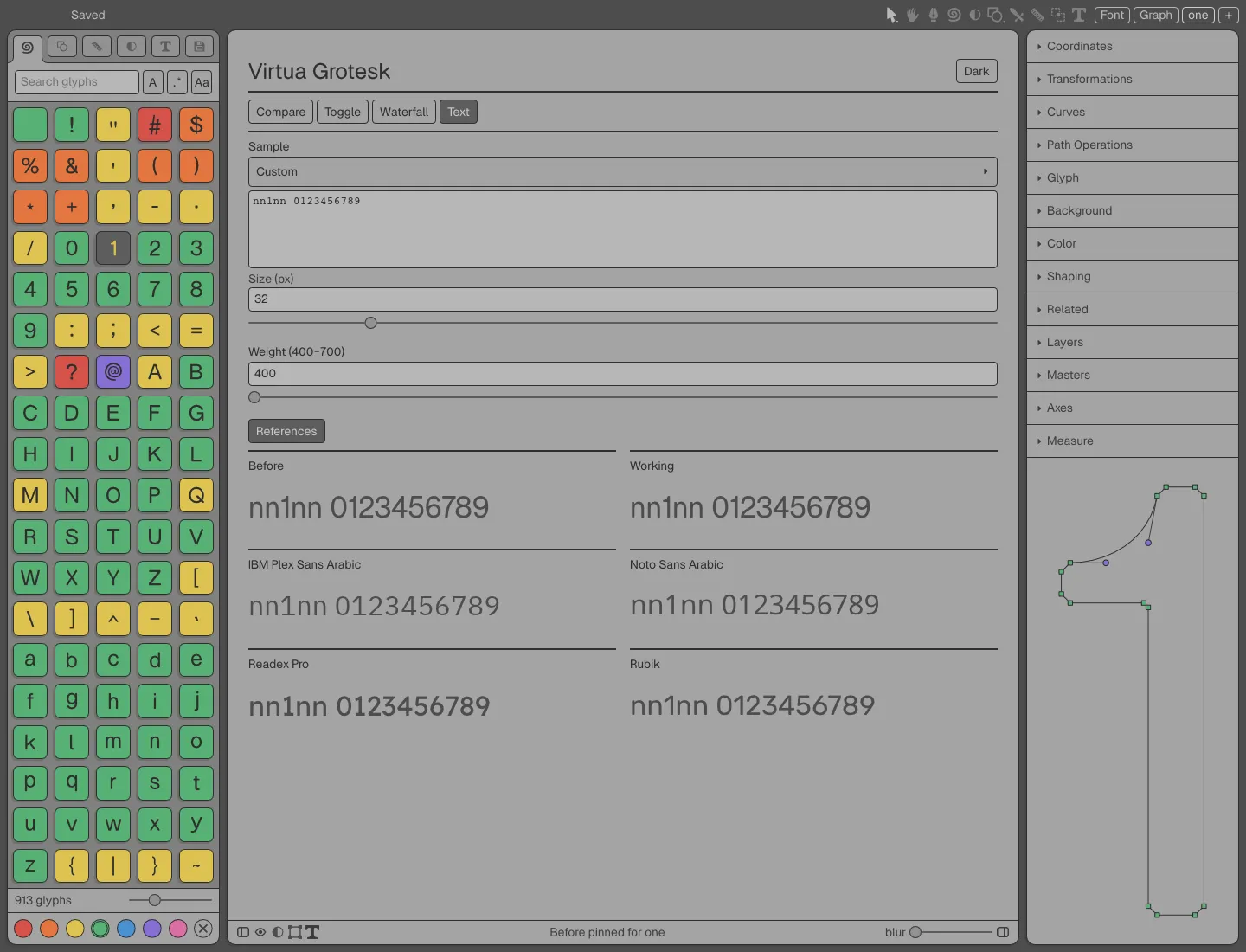
Runebender’s proof page in Text mode: Before and Working samples of Virtua Grotesk above samples in four reference fonts.

Compare shows Before and Working side by side. Toggle switches between them in place, for quick repeated checks. Before is an in-memory baseline; editing Working does not change it.

Waterfall and Text use the compiled font with real shaping: Waterfall at 72, 48, 36, 24, 18, and 12 px, Text at a chosen size. Samples are Glyph, Spacing, Alphabet, or custom text. The text can be selected and copied.

The proof reads the open document, including unsaved edits. A light or dark setting covers the whole proof area.

04 Demo

Local AI for Type Design

Reference fonts

Comparison fonts go in a reference-fonts folder.

  1. Locationnearest Git root
  2. Licensed fontsadd to .gitignore
  3. Weightsnearest match
  4. Missing glyphsshown, not replaced
  5. Downloadsnone

Outside Git, the folder goes beside the font or designspace. TTF and OTF files are found recursively; webfonts, collections, hidden files, and symlinks are skipped. Each font is limited to 32 MiB.

Faces are grouped by family, width, and italic. The nearest supplied weight is used, the lower one on a tie, and a variable font is set to the requested weight. There is no synthetic bold or italic, and a substituted weight is labeled.

If a reference lacks a glyph, that specimen is withheld rather than drawn in a system font. Adding or removing files updates the proof within about a second, without losing unsaved edits.

Put /reference-fonts/ in .gitignore before adding licensed fonts, so they are never committed.

04 Demo

Local AI for Type Design

Shared proofs

The Virtua Grotesk browser proof and Runebender use the same review.

  1. Same four modes
  2. Same reference folder
  3. Different renderers
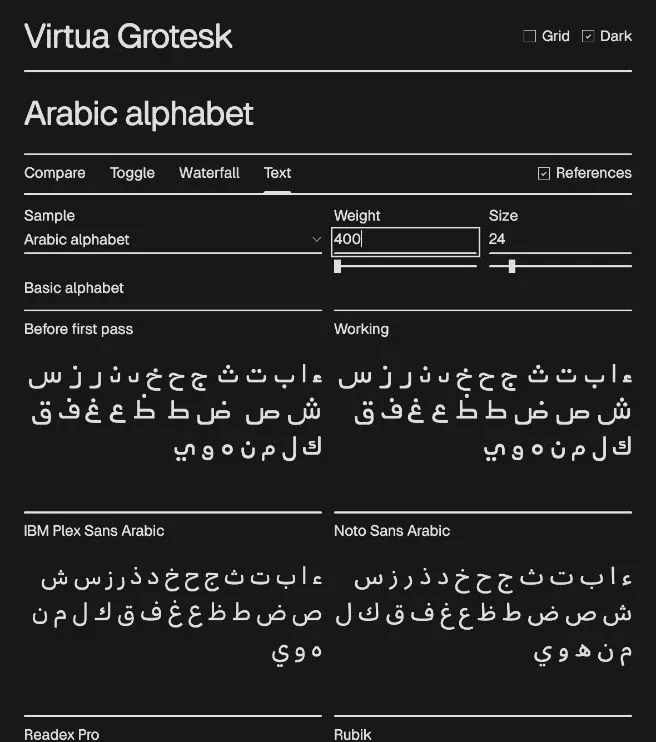
The Virtua Grotesk browser proof in Text mode: an Arabic alphabet sample, Before and Working, above IBM Plex Sans Arabic and Noto Sans Arabic.

The Virtua Grotesk design review runs in a browser proof that agents such as Codex use. Runebender’s native proof now has the same modes (Compare, Toggle, Waterfall, Text) and reads the same reference-fonts folder with the same weight matching.

A designer can move between the agent review and the editor without learning a second set of conventions.

The two are not pixel-identical. The native proof reads the open document and its unsaved edits. The browser proof reads prepared snapshots, which are archived with hashes of the reference fonts used.

05 Training

Local AI for Type Design

How a model learns

It predicts, measures the error, and adjusts its weights, over and over.

  1. Start from random weights
  2. Predict one training example
  3. Measure how far off it is
  4. Adjust the weights a little
  5. Score it on examples it never saw

The error is measured as a loss. One pass over the whole training set is an epoch. A fixed set of examples is kept out of training; the score on those picks the best checkpoint and shows whether the model learned the design or only memorized the examples.

The two models that follow learn this way, but they predict very different things.

05 Training

Local AI for Type Design

Two approaches

Virtua-12M

Draws outlines as drawing commands.

  1. Outputoutline tokens
  2. Learns fromits own font’s sources
  3. TaskBold, sketch to outline

NeuralType Nasta’liq

Draws shapes as distance fields.

  1. Outputfield, then traced
  2. Learns fromGulzar’s shaped text
  3. Taskeach shape in context

elih.net/blog/virtua-grotesk and nastaliq-distilled

Virtua-12M is an outline model. It writes a glyph as a sequence of tokens (MOVE, LINE, CURVE, coordinates), so its output is an editable outline with real points. A small error can break the outline, which is why the grid matters: every coordinate is one token on the font’s own grid.

NeuralType is a field model. It predicts a grid of distances to the nearest edge for each shape, and a tracer turns the zero crossing into a Bézier outline. A small error moves an edge slightly instead of breaking the outline. It suits Nasta’liq, where a letter’s shape depends on its neighbors.

Both are small and specialized: each learns one design, not a library of fonts.

05 Training

Local AI for Type Design

Virtua-12M

Drafts the Bold from the Regular, point by point.

  1. Parameters12.54 million
  2. Modeltransformer
  3. Held-out Bold error24.0, baseline 31.3
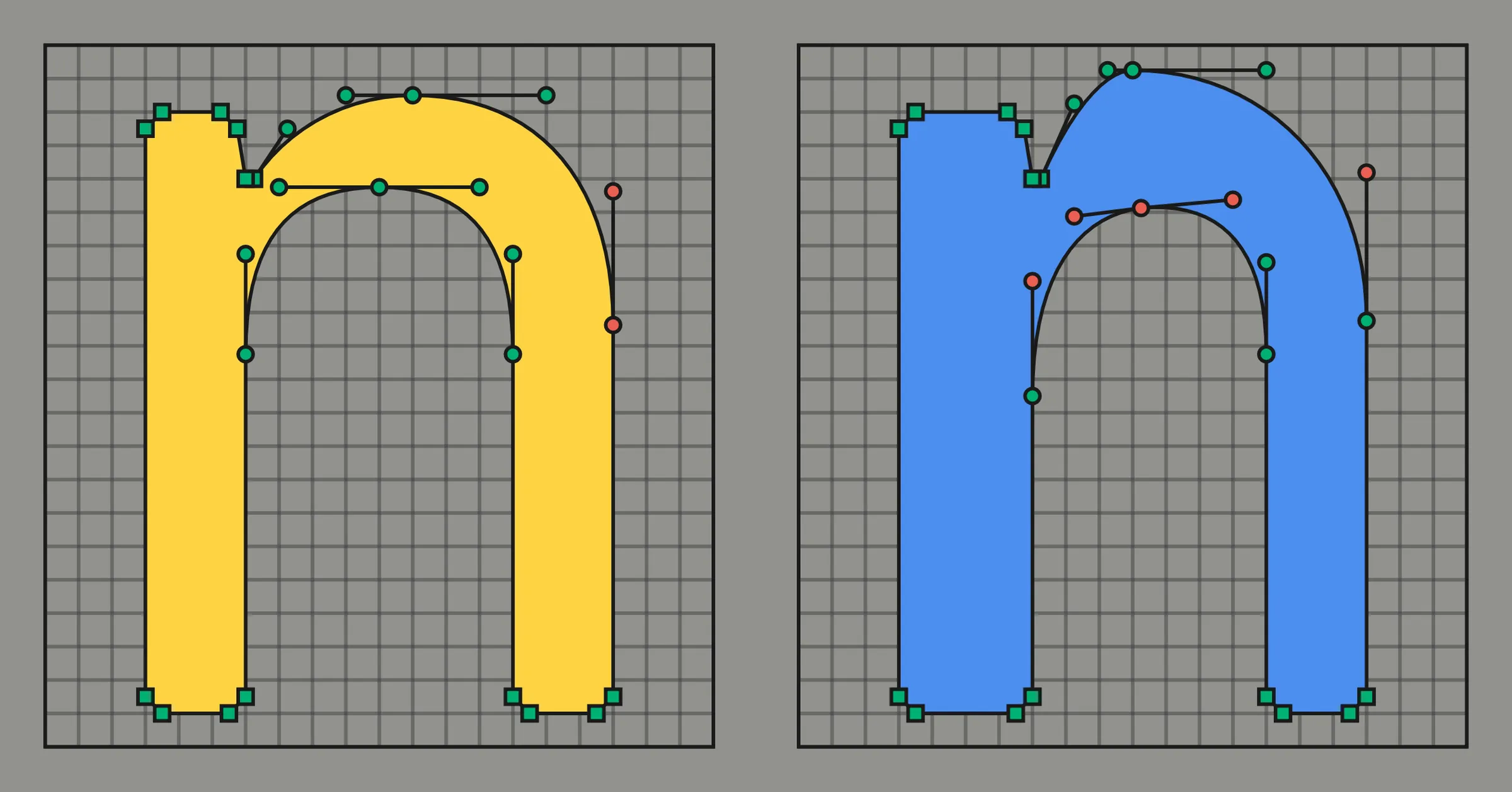
The lowercase n of Virtua Grotesk on its design grid: the drawn Regular on the left, and the Bold drawn by Virtua-12M-v0.1 on the right.

Virtua-12M-v0.1: a decoder-only transformer, 6 layers, 384 dimensions, 8 heads; 1,784 tokens of vocabulary; a 50 MB checkpoint. A codec turns each UFO glyph into tokens and back without loss, because Virtua Grotesk is drawn on the same grid as the tokens. A glyph is about 90 tokens, for example: BOS N_two U_0032 W400 ADV 592, MOVE 48 0, LINE 528 0, and so on to CLOSE and EOS.

For weight transfer it predicts, for each Regular point, the move to its Bold position. On ten held-out Bold glyphs, average coordinate error was 24.0 ± 1.6 over five seeds, against 31.3 for shifting each Regular by the average change.

Version 0.1 was pretrained on Google Fonts pairs; I dropped that stage. The corpus is now Virtua Grotesk only: 111 approved Regular-to-Bold pairs, about half Arabic. An open-weight release on Hugging Face is planned.

05 Training

Local AI for Type Design

NeuralType

A Nasta’liq font that draws each shape from the letters around it.

  1. Parameters1.36 million
  2. Font file1.38 MB
  3. Held-out shape overlap0.945
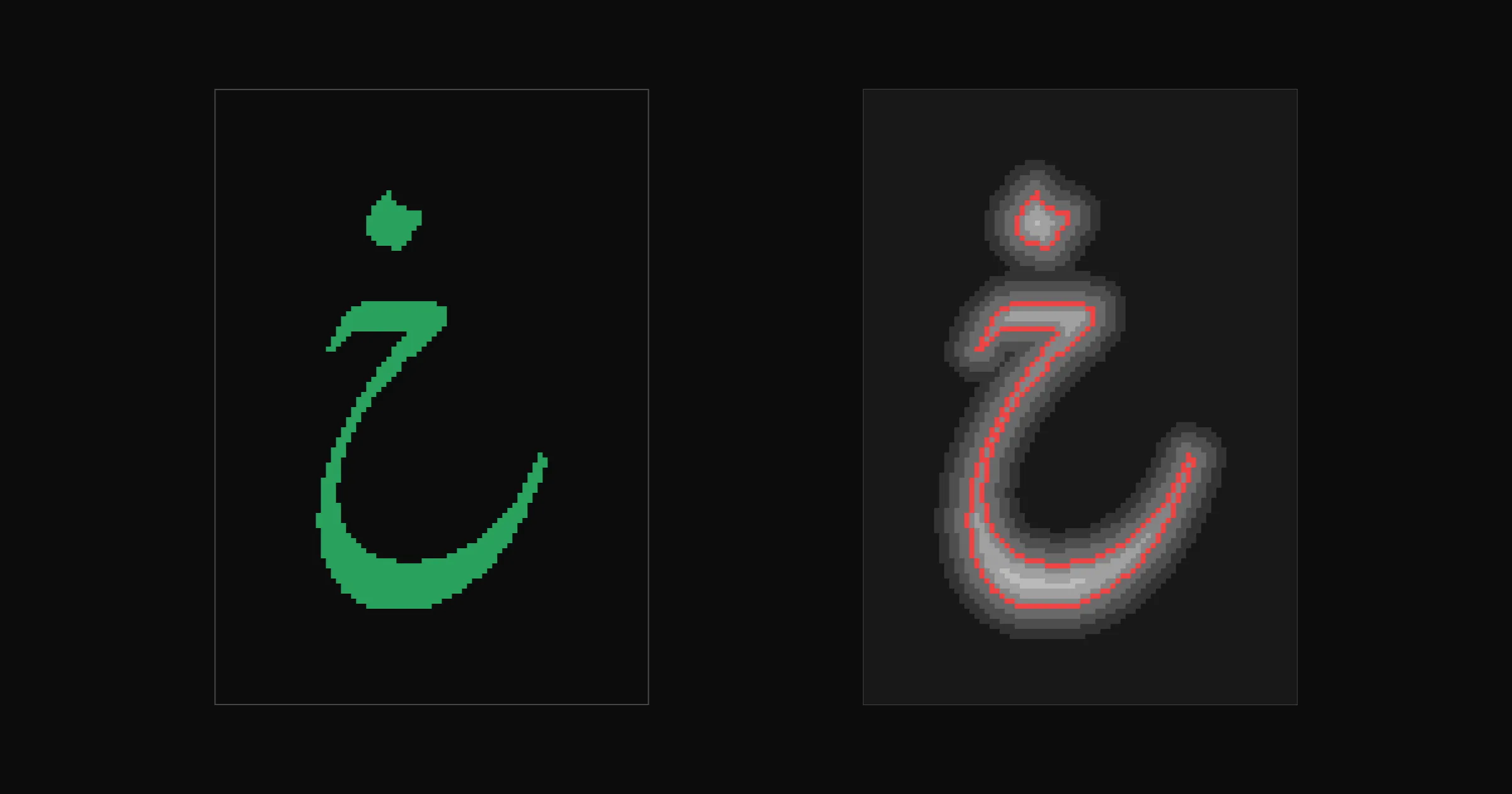
The isolated Nasta’liq letter kha from Gulzar, and the same shape as a signed-distance field with its zero contour marked in red.

NeuralType is a font format that is a small neural network. This model was distilled from Gulzar, an OpenType Nasta’liq font: Gulzar and the HarfRust shaper were the teacher. The dataset has every one-, two-, and three-letter string, 30,783 in all, plus 24 longer words: 91,390 examples covering 1,150 distinct shapes.

A feed-forward network turns the nearby letters into one description of the shape, decodes it into a 155 × 219 signed-distance field at 64 pixels per em, and predicts the shape’s offset. The renderer traces the field into a Bézier outline. No OpenType shaping runs at runtime.

Shape overlap (IoU) on held-out examples was 0.945. It measures shape, not position, and not new words: the model still breaks on some unseen words. The weights are 8-bit; the file is 1.38 MB.

The next Nasta’liq model trains from labeled drawings alone, with no teacher font.

05 Training

Local AI for Type Design

On a Mac or a PC

Mac, Apple silicon

MacBook Pro, M4 Pro.

  1. LibrariesMLX, Candle
  2. Shapes model29 minutes
  3. Virtua-12M-v0.13 h 20 min

PC, NVIDIA

RTX 2060 SUPER, 8 GB.

  1. LibrariesPyTorch, Candle
  2. Virtua-12M run20 minutes
  3. Nasta’liq model100 s per epoch

From elih.net/blog

Shapes model: 5.5 million parameters, 15,000 steps on an M4 Pro laptop in 29 minutes, ending at a validation loss of 0.85. The quick run, 6,000 steps, takes about 12 minutes.

Virtua-12M-v0.1 trained on the M4 Pro with MLX in 3 hours 20 minutes. Training then moved to the Linux PC: an eight-year-old card with 8 GB, about a sixteenth of a second per step, a full run in twenty minutes. Both builds must give identical output; a script loads one set of weights into each and compares them.

The Nasta’liq model trained with Candle on the same card: 1.36 million parameters, about 100 seconds per epoch, using 2.9 GB of the card’s memory.

None of this needs a data center. A model of a few million parameters trained on one design fits on hardware a designer already owns.

05 Training

Local AI for Type Design

Measuring a model

Score every model on examples it never saw, and say what the score misses.

  1. Hold out examplesnever trained on
  2. Compare with a baselineor the teacher
  3. Run several seedsnot one run
  4. State the limitswhat it can’t do

Virtua-12M: on ten held-out Bold glyphs, coordinate error 24.0 ± 1.6 over five seeds, against 31.3 for a plain mean shift. The first result I recorded, 20.9, was a lucky single run. Shape (Chamfer) 22.4 against 37.4; filled-ink overlap (IoU) 0.745 against 0.564.

NeuralType Nasta’liq: shape overlap 0.945 on held-out examples. The held-out set comes from the same short strings as training, so the number says nothing about new words, and it measures shape only, not position.

A script can also check conventions: 85 percent of the points in Virtua Grotesk’s sources sit on its 8-unit grid, and 68 percent of the model’s points do.

05 Training

Local AI for Type Design

Where this goes

A designer draws the core. Models trained on those drawings draft the rest.

  1. Weights and sketchesVirtua-12M
  2. Shapes in contextNeuralType
  3. Training from drawings aloneno teacher font
  4. Fonts that are modelspost-OpenType

Virtua-12M is aimed at finishing Virtua Grotesk: drafting Bold from Regular and redrawing sketches in the font’s conventions, then a second design (Virtua Oldstyle) on the same grid.

NeuralType is aimed at scripts that OpenType serves badly. Distilling Gulzar showed it can work; the next model trains from labeled drawings alone, so the font is designed for the format from the start.

Both point toward fonts that are models rather than tables of outlines: a model that draws each glyph in context, without the per-glyph boxes digital type inherited from metal type.

06 Hardware

Local AI for Type Design

06

Hands-on setup

Install Runebender and run a first model on your own machine.

06 Hardware

Local AI for Type Design

Memory size

The model must fit in memory.

  1. qwen3.5-4b2.9 GB
  2. gpt-oss-20b12.1 GB
  3. qwen3.6-27b17.6 GB
  4. qwen3.6-35b-a3b22.4 GB

For people new to local models: the processor matters less than the size and speed of the memory the model can use.

At 4 bits, a model takes about 0.6 GB per billion parameters, plus space for the context. These are my own chat models as 4-bit GGUF files.

The operating system also needs memory. On a 16 GB machine, keep the model under about 10 GB.

06 Hardware

Local AI for Type Design

Memory bandwidth

Faster memory gives faster answers.

  1. Each token reads the active weights once
  2. Upper limit: bandwidth ÷ model size
  3. 273 GB/s ÷ 17.6 GB: about 15 tokens/s

The example is qwen3.6-27b on a MacBook Pro with an M4 Pro. Measured speed is lower than the limit.

06 Hardware

Local AI for Type Design

Mixture of experts

The model reads only part of its weights for each token.

  1. 35B parameters, 3B active
  2. The memory of a large model
  3. The speed of a small model

qwen3.6-35b-a3b on the M4 Pro: upper limit about 130 tokens/s, against about 15 for the dense 27B.

Measured on AMD Strix Halo, 128 GB: Qwen3 30B-A3B about 100 tokens/s, gpt-oss-120b about 55, dense Llama 3.3 70B about 5.

Many current open models are mixtures of experts, including gpt-oss and the Qwen3 A3B models. This is why machines with large unified memory are useful for local inference.

06 Hardware

Local AI for Type Design

Three kinds of machine

Each trades memory size against speed.

  1. Graphics card24 to 32 GB, fastest
  2. Unified memoryup to 512 GB
  3. Multiple cardslabs and teams

Graphics card: NVIDIA’s CUDA is supported by all inference and training tools.

Unified memory: the processor and the graphics share one pool, with lower bandwidth than a card. Macs, AMD Strix Halo, NVIDIA DGX Spark.

Multiple cards: tinybox, RTX Pro 6000 builds, DGX Station. Small models, such as the Runebender font models, also train on Apple Metal.

06 Hardware

Local AI for Type Design

Example machines

Memory is the number to compare.

  1. PC, RTX 3090 or 509024 to 32 GB
  2. Strix Halo, Framework128 GB
  3. NVIDIA DGX Spark128 GB
  4. Mac Studio, M536 to 512 GB
  5. NVIDIA DGX Station748 GB

US prices, October 2026. Memory shortages raised many of them during 2026.

  • Used RTX 3090: 24 GB, 936 GB/s, $700 to $1,050 per card.
  • RTX 5090: 32 GB, 1,792 GB/s, $2,400 to $4,300 per card.
  • Strix Halo mini PC (AMD Ryzen AI Max+ 395, GMKtec, HP, Beelink, Minisforum): 128 GB, 256 GB/s, from about $2,000.
  • Framework Desktop, Max+ 395: 128 GB, $3,449. PRO 495: 192 GB, $6,799 kit, ships November 2026.
  • DGX Spark: 64 or 128 GB, 273 GB/s, $3,999 at launch, now higher. Two units link for 256 GB.
  • Mac Studio M5 Max: 36 to 128 GB, 460 to 614 GB/s, from $2,499. M5 Ultra: 96 to 512 GB, 1.2 TB/s, from $5,499; 512 GB expected above $10,000.
  • RTX Pro 6000 Blackwell: 96 GB per card, $9,000 to $16,000. tinybox green v2: 4 × RTX 5090, about $45,000.
  • DGX Station GB300: 748 GB, 252 GB of it HBM at 7.1 TB/s, $85,000 to $160,000 from OEM partners.
  • Mac Pro: discontinued March 2026, replaced by the Mac Studio.

Linux PC parts: 1000 W power supply for two cards, 64 GB system memory, 2 TB NVMe. llama.cpp splits a model across cards.

06 Hardware

Local AI for Type Design

Choosing a machine

Start with the computer you have.

  1. Font models train on a laptop
  2. A 4B chat model needs 8 GB
  3. 120B chat models need 128 GB
  4. When a task is too slow, buy memory
  • Train small font models: a Mac with Apple silicon, or an NVIDIA card with 8 GB or more.
  • 30B models at high speed: a 24 to 32 GB NVIDIA card, or a Mac with 48 GB or more.
  • The largest open models: Mac Studio M5 Ultra, 256 to 512 GB.
  • Teams, or training large models: RTX Pro 6000 builds, tinybox, DGX Station.

My setup: MacBook Pro M4 Pro 48 GB for chat and coding with qwen3.6-35b-a3b. Linux PC with an RTX 2060 SUPER, 8 GB, for training, about 100 s per epoch. Steam Deck runs qwen3.5-4b at 18 tokens/s.

06 Hardware

Local AI for Type Design

Runtimes

A runtime loads a model and runs it.

  1. llama.cppchat models
  2. font-mlRunebender models
  3. MLXApple
  4. Ollama, LM Studiodesktop apps

llama.cpp runs GGUF files on Mac, NVIDIA, AMD, and CPU. font-ml uses Candle and trains as well as runs.

Ollama and LM Studio are built on llama.cpp and MLX. They are the simplest first step outside Runebender. vLLM serves many users at once on NVIDIA servers.

07 Setup

Local AI for Type Design

What you need

The app, a few helper programs, and a models folder.

  1. RunebenderDMG or Cargo
  2. llama-server, for chatHomebrew
  3. font-ml, for font modelsCargo
  4. whisper-server, for voiceoptional
  5. Designbot, for proof imagesoptional
  6. Models~/Runebender/models

llama-server comes from llama.cpp: brew install llama.cpp. The editor looks for it inside the app first, then RUNEBENDER_LLAMA_SERVER, then PATH and the Homebrew folders. It stays outside the app on purpose, so one server can serve Runebender, Pi, and other tools at the same time.

font-ml runs and trains the font models: Local AI Shapes, bolden, and the node editor’s model tasks. It is not in the DMG yet; bundling it is planned. Until then, install it with cargo install --git https://github.com/eliheuer/font-ml --features metal, which needs Rust. The editor looks in RUNEBENDER_FONT_ML, then PATH, then ~/.cargo/bin.

whisper-server comes from whisper.cpp: brew install whisper.cpp. Upgrade llama.cpp and whisper.cpp together; they share Homebrew’s ggml package.

Designbot renders the proof images that review_proof sends to agents and the Chat panel. Install it with Cargo. The proof page itself does not need it.

Models: chat models are downloaded GGUF files; font models are trained in the editor or with font-ml. Nothing is downloaded by the editor.

07 Setup

Local AI for Type Design

How it fits together

Runebender starts each helper when a feature needs it.

  1. Chat panelllama-server, a GGUF model
  2. Font modelsfont-ml, a model folder
  3. Talk buttonwhisper-server, model.bin
  4. Coding agentsrunebender mcp

Chat: the panel first asks a shared server on 127.0.0.1:8080 for its model list. If the chosen model is there, the chat uses it. Otherwise the editor starts its own llama-server with the model’s GGUF file, and stops it when the editor quits.

Font models: the editor runs font-ml as a separate process for each training run or draft, and installs the result as a proposal.

Voice: the Talk button appears only when whisper-server and a model folder whose name starts with whisper are both found.

Agents: runebender mcp --install registers the editor with Claude Code, Codex, Claude Desktop, and Cursor. Those agents connect to the open window; they do not need any of the helpers above.

Everything runs on the machine. The helpers listen only on 127.0.0.1.

07 Setup

Local AI for Type Design

Model sources

Most models come from Hugging Face. Font models you train yourself.

  1. Original chat modelsQwen, Google, OpenAI
  2. GGUF conversionsggml-org, Unsloth
  3. Speech modelwhisper.cpp
  4. Shapes base modeldemo repository
  5. Font modelstrained by you

Hugging Face (huggingface.co) is where most open models are published. A model page lists its files, its license, and the SHA-256 checksum of each large file.

The original models are published by the labs: Qwen (Alibaba), Google (Gemma), and OpenAI (gpt-oss). llama.cpp needs GGUF files. ggml-org, the llama.cpp project’s own account, and Unsloth publish GGUF conversions at several sizes. The chat models on my machine are Unsloth’s 4-bit conversions. The demo repository’s script downloads from ggml-org and checks each file’s SHA-256.

The Whisper speech model is a whisper.cpp file from huggingface.co/ggerganov/whisper.cpp. The shapes base model is in the demo repository’s GitHub release, with a checksum. Bolden and shapes models are trained on your own machine from your own fonts.

07 Setup

Local AI for Type Design

Model safety

A model is a file from someone else. Check it before you run it.

  1. Check the publisherexact account name
  2. Use GGUF or safetensorsdata, not code
  3. Avoid PyTorch pickle filescan run code
  4. Compare the checksumSHA-256
  5. Read the license
  6. Keep llama.cpp updated

Publisher: download from the original lab or a known converter, such as Qwen, google, openai, ggml-org, or unsloth. Check the account name letter by letter; copies under similar names exist.

Format: GGUF and safetensors hold numbers and metadata only. Older PyTorch files (.pt, .pth, .pkl, and some .bin files) use Python’s pickle format, which can run code when the file is loaded. Runebender and llama.cpp do not load pickle files, but other tools do.

Checksum: Hugging Face lists the SHA-256 of each large file. Compare it with shasum -a 256 on the downloaded file. The demo scripts do this for you.

Updates: bugs in model file readers, including llama.cpp’s GGUF reader, have been found and fixed. Upgrade llama.cpp and whisper.cpp together.

Behavior: a model can be trained to give wrong or harmful answers, and a checksum cannot show that. Test a model on your own work before you rely on it. In Runebender a model can only read, proof, and propose; it cannot save or change the font without you.

07 Setup

Local AI for Type Design

Installation

Download the DMG, or build from source.

  1. Apple silicon MacDMG, runebender.org
  2. Intel Mac, LinuxCargo, Rust 1.96+
  3. font-mlCargo, for now

DMG: github.com/fontgarden/runebender/releases/tag/v0.1.0-alpha.1, also linked from runebender.org. Open it, drag Runebender to Applications, eject, and open it from Applications.

From source: cargo install --git https://github.com/fontgarden/runebender. This installs the current main branch, not the frozen alpha. It needs Rust 1.96 or newer.

cargo install --git https://github.com/eliheuer/font-ml --features metal (or cuda, or no feature for CPU)

Linux (Debian or Ubuntu) needs system libraries first: libfontconfig-dev libwayland-dev libxkbcommon-dev libx11-dev libxcb1-dev libvulkan1 libssl-dev libglib2.0-dev libgtk-3-dev libxdo-dev libasound2-dev.

Runebender is meant as a base to customize. Building from source is the normal way to use it; the DMG is a quick start. The DMG is for Apple silicon Macs. While Runebender is in alpha, Intel Macs and Linux PCs build Runebender and font-ml from source with Cargo.

Compiling takes about fifteen minutes.

07 Setup

Local AI for Type Design

Setup with a coding agent

Give Claude Code or Codex this request.

Read https://runebender.org/
local-ai-setup-prompt.md
and set up Runebender for
local AI on this machine.

The instructions tell the agent to inspect the machine first, ask before each download or install, leave your fonts unchanged, train a first shapes model, and report what it did.

The chat model download is optional, about 800 MB. The agent does not open the editor unless asked.

07 Setup

Local AI for Type Design

Exercises

Work through the demo repository in order.

  1. Draw from text
  2. Train and bolden
  3. Chat model
  4. Node editor
  5. A real font

git clone https://github.com/eliheuer/runebender-local-ai-demo

  • 01-draw-from-text: train a shapes model from scratch, then fine-tune it.
  • 02-train-and-bolden: train a bolden model and bolden a new shape.
  • 03-chat-model: download an open-weight chat model and ask about the font.
  • 04-nodes: the same steps as a workflow in the node editor.
  • 05-real-font: the bolden loop on Virtua Grotesk.

Exercise 01 is the one to finish if there is time for only one. To reset the fonts, run git checkout -- fonts.

08 Agents

Local AI for Type Design

Agents over MCP

Coding agents can work in the open editor.

  1. runebender mcp --install
  2. 48 tools and 6 workflows
  3. They propose, you install

Works with Claude Code, Codex, Claude Desktop, and Cursor. The agent works on the open document, including unsaved changes. It reads first and proofs the result.

Workflows: review-glyph, triage-font, compatibility-check, spacing-pass, kerning-pass, draft-weight.

Figma and Penpot have MCP servers, Glyphs has a third-party one, and FontLab 9 has an in-app chat. Runebender adds a review step and a safety contract: proposals, receipts, no saves.

08 Agents

Local AI for Type Design

Proof images

An agent can request the comparison image the designer sees.

  1. Toolreview_proof
  2. Tested withPi 1.4.0
  3. Local Chatvision models
  4. Neversaves or applies
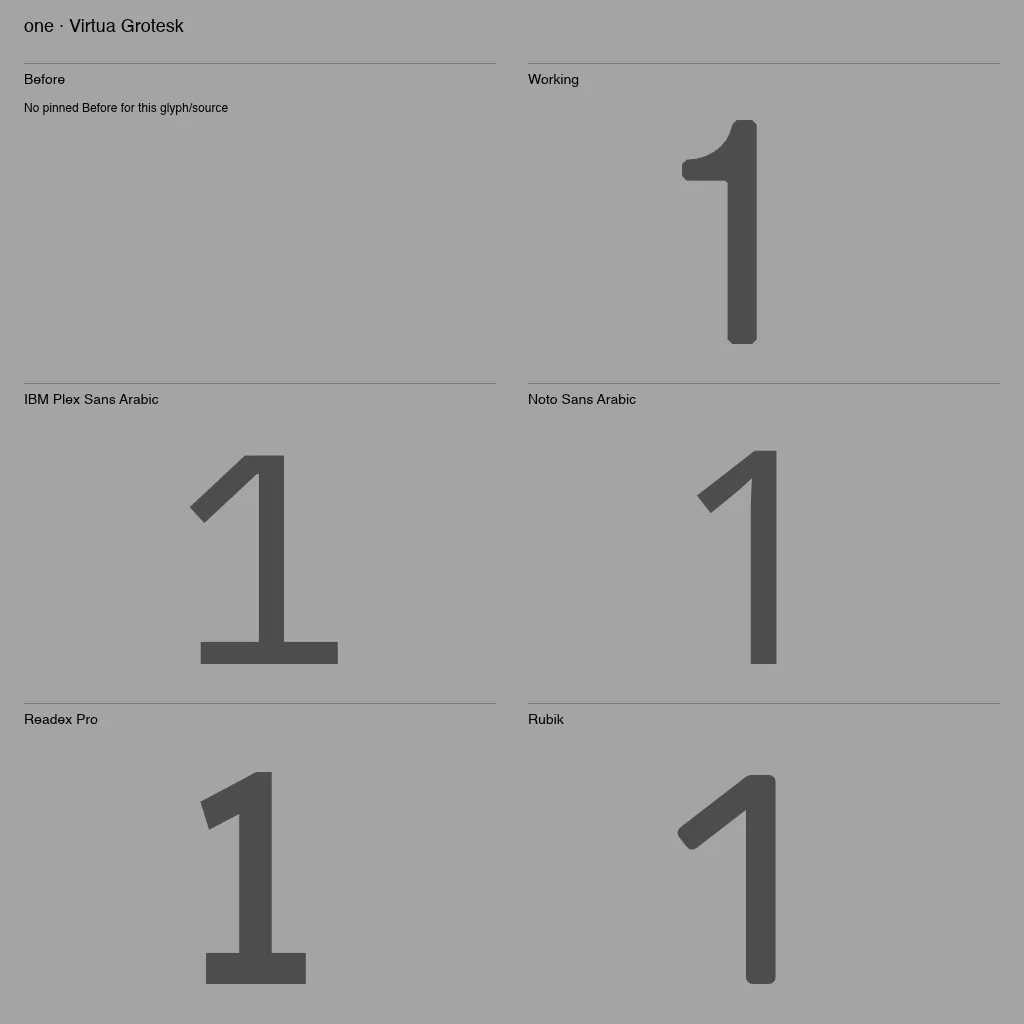
A proof image for the glyph one in Virtua Grotesk: Working beside an empty Before, above the same glyph in IBM Plex Sans Arabic, Noto Sans Arabic, Readex Pro, and Rubik.

review_proof captures the active glyph’s comparison with up to four reference fonts per page, rendered by Designbot outside the editor. The request must name the exact source, glyph, document epoch, and revision from editor_context, so a stale request is rejected.

It does not switch sources, reset Before, apply proposals, or save. A missing Before is labeled, as in this image from a real Pi session.

Pi setup: pi mcp add runebender -l --exposure direct -- runebender mcp --live. Pi keeps this in .pi/mcp.json.

The Chat panel sends the same image to its model, which must accept image input. A text-only model cannot use it.

08 Agents

Local AI for Type Design

Planned work

The same rules apply to each new feature.

  1. Spacing and kerning drafts
  2. Drawing a missing character
  3. A model that ranks drafts
  4. Local models in the review loop
  5. One model for several families

Drafts are proposals, only the designer grades, and every engine is scored against drawn pairs.

The ranking model is scored against the designer’s corrections before it is used. The second family for the shared model is Virtua Oldstyle, drawn on the same grid.

Links

Local AI for Type Design

Thank you

Eli Heuer
eli@elih.net

  1. runebender.org, download
  2. github.com/fontgarden/runebender
  3. github.com/eliheuer/font-ml
  4. github.com/eliheuer/runebender-local-ai-demo
0:00
→ next · ← previous · R reset timer · keys here drive the deck