img2bez:
Raster-to-Vector Autotracing for Type Design
img2bez is a Rust crate that traces raster images into bézier outlines and writes them directly into UFO font sources. The project is on GitHub here: github.com/eliheuer/img2bez, dual-licensed under Apache-2.0 or MIT.
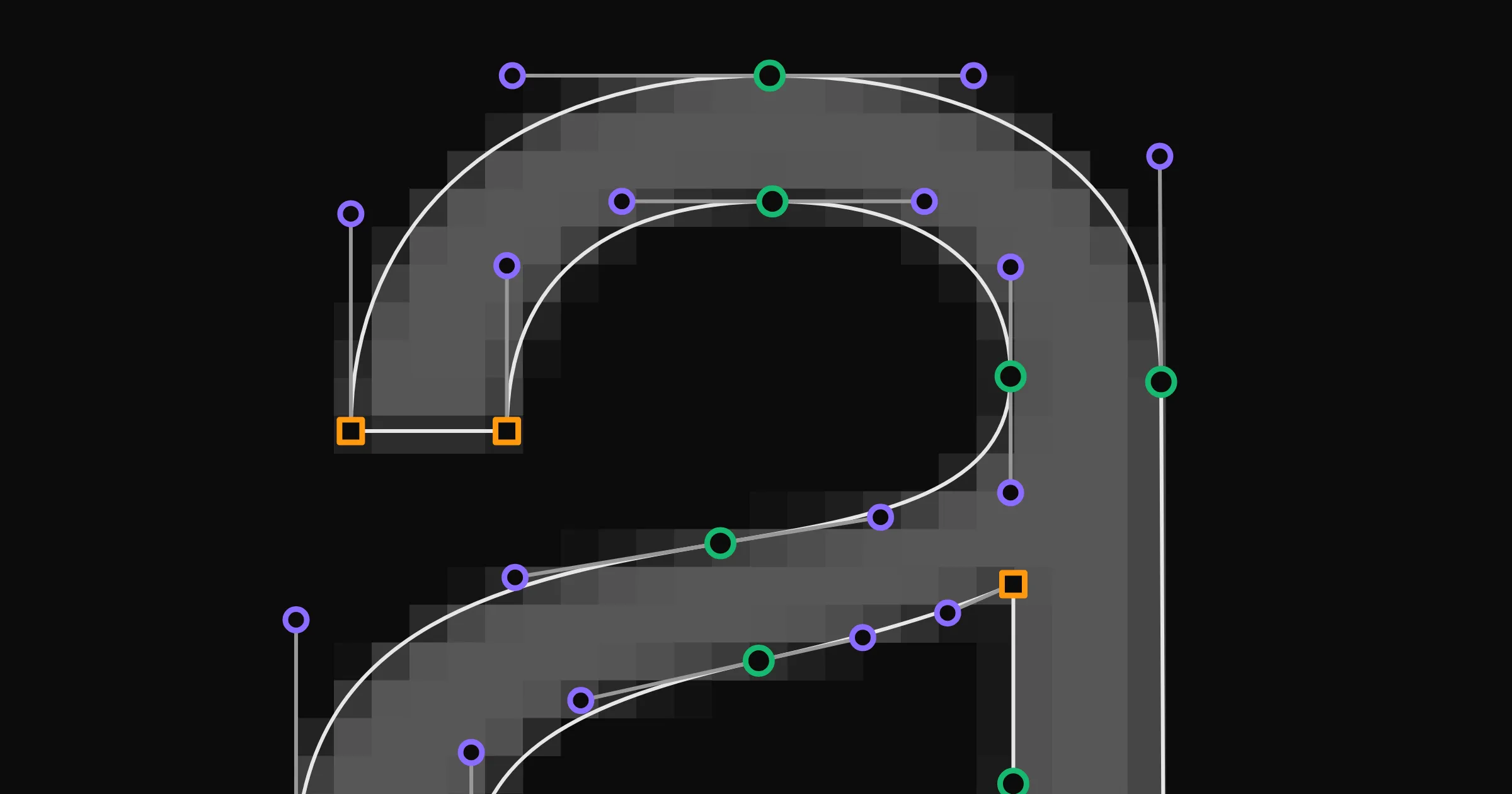
Below is an interactive demo of img2bez compiled from Rust to WASM. Click “Trace” to vectorize a raster image and see the outline it produces, and drop an image onto the application to try your own glyph. The settings change the output when you click “Trace”, but the ones to watch are the Rules vs Learned toggles, which swap a structural decision from the procedural rule to a trained ML model. These are tiny, task-specific models small enough to compile straight into the binary and run client-side in your browser with no server in the loop.
Note: img2bez is built for tracing high-resolution AI-generated raster images, so a 1024x1024 generated glyph is what it handles best. Scans and photos work too, and a few settings help with them, but they are not what the tool is tuned for.
Section Index
01. Installation & Setup
Install the Rust CLI tool and trace a raster image:
# install the CLI toolcargo install --git https://github.com/eliheuer/img2bez
# trace a glyph image into a UFO (creates the UFO if it doesn't exist)img2bez --input glyph.png --output MyFont.ufo --name A --unicode 0041
Or use it as a Rust library:
use img2bez::{trace, TraceOptions};
let bytes = std::fs::read("glyph.png")?;let outline = trace(&bytes, &TraceOptions::default())?;
for path in outline.to_bezpaths() {    println!("{}", path.to_svg());}
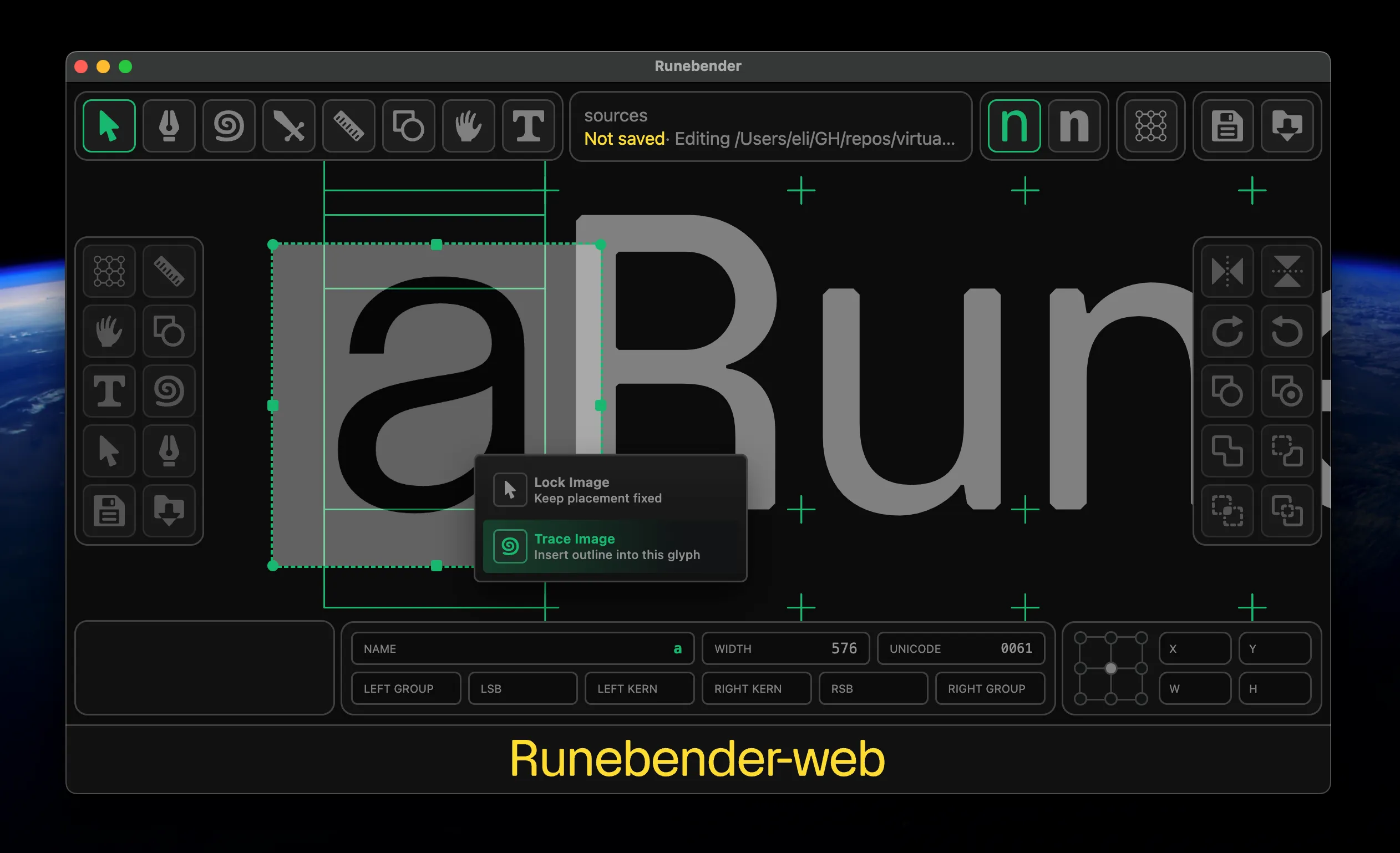
You can also use it inside a font editor like Runebender-Xilem or Runebender-Web. The simplest path is the browser. Open runebender.org, drag and drop an image into the edit view, then right-click it and choose Trace Image. Runebender supports generative tracing too, through the QuiverAI API and runebender-comfy, a ComfyUI-node version of runebender-web that wires it to local models; img2bez is the default procedural path alongside them.
02. The Problem: Structure, Not Just Silhouette
Procedural raster-to-vector tracing is an old problem with many open-source tools available, but for type design it remains largely unsolved. Outlines from existing tracers are usually lower quality than what a person would draw, and need a second cleanup pass by a human or an AI.
The reason is that a font source’s structure, not just its silhouette, is what makes it usable. Drawing an outline is less like tracing a shape than like building a low-polygon 3D mesh for a video game: the points have to be placed so the structure holds together and interpolates cleanly.
Most existing autotracers optimize for the silhouette and leave the structure to a human, and cleaning that up is sometimes more work than drawing the glyph from scratch. They work this way because the software has historically been built by engineers solving the general tracing problem, and type-design conventions are specialized knowledge well outside that scope. Those conventions are also easy to dismiss from the outside, half of them are load-bearing and half are nonsense, and it takes years to learn to separate the wheat from the chaff.
Variable fonts are where structure matters most, and img2bez is designed specifically for creating variable fonts from AI-generated raster images. An image model makes one raster at a time, so you generate a raster for each master (a glyph’s weights or styles) and trace them into sources. To interpolate, the masters have to be compatible: the same points in the same order. Because img2bez always puts points at the same structural features (extrema, corners, inflections), masters of one glyph usually come out compatible on their own. For the cases that don’t, img2bez has a multi-master mode: you tell it a set of images are the masters of one variable font, and it traces them together, deciding on one point structure across the whole set and running an interpolation-reconciliation pass that aligns the contours and fills in any missing points (more below).
img2bez is designed to be fast and cheap enough to embed directly in a font editor or a SaaS product. You could instead hand the whole job to a large generative model, and pure generative approaches are getting better, but they are slow and expensive to run. img2bez is built to be the opposite: fast, cheap, and deterministic even where it uses ML. Most of it is a procedural tracer, and where a call is too subtle for a fixed rule a small learned model makes it instead. Those models are tiny and compiled into the binary, so they keep the same properties as the procedural code: the same input gives the same output, in milliseconds, with no GPU and no server. So img2bez does the bulk of the work up front: the tracer gets roughly 90% of the way, small learned models and a refinement pass the harder 9%, and a human designer the final 1%. The AI stays small and local: discriminative models that decide rather than generate, the first of which now ships (more below), with img2bez-specific LoRAs for open-weight image models planned next.
03. Existing Approaches, and Why They Solve a Different Problem
Classical tracers. Potrace (2003, used in Inkscape and FontForge) and its faster Rust successor vtracer both reconstruct a shape’s silhouette: they trace the pixel boundary and fit curves to it, with no notion of glyph structure, no points at extrema, no horizontal or vertical handles, nothing placed for interpolation. vtracer even says it “favours fidelity over simplification.” They are built to reproduce an image; img2bez is built to produce a font source.
Curve fitting. Reducing a dense run of points to a few bézier segments is a well-understood step, from Philip Schneider’s fitter in Graphics Gems (1990) to Raph Levien’s work in kurbo that img2bez builds on. But a fitter adds a point wherever a curve strays too far, which are rarely the points type wants (the extrema and inflections, handles on-axis). Even Spiro, the closest tool to this problem, smooths curves for a designer tracing by hand; it does not find them in the pixels. Deciding the structure is the part none of these do, and where img2bez begins.
Newer, learning-based methods come in two kinds, and both miss what type needs. Optimization methods move control points by gradient descent until the rendered curves match the target image, using the differentiable rasterizer diffvg (whose pixel-scoring objective img2bez borrows). But they run on a GPU with a stochastic solver, the opposite of the fast, deterministic, embeddable trace an editor needs. Generation methods have a model emit SVG directly (StarVector, OmniSVG), aiming for image fidelity rather than the conventions type requires. Tellingly, the newest generative pipelines still hand the actual conversion to a classical tracer: LayerTracer (2025) generates a raster and then passes it to vtracer, inheriting its limitations. That is the gap img2bez addresses.
04. How img2bez Works
img2bez works in four stages. (Fuller detail, including the point-classification model at the core of stage 2, is in the git repo.)
-
Find the edge precisely. Most tracers first flatten the image to pure black and white, throwing away the soft edge pixels. img2bez reads the edge straight from the gray, following the line where the pixels cross from ink to paper, like a contour line on a map. That locates it to a fraction of a pixel.
-
Place the points, then fit the curves. It walks the edge and marks the points that matter: corners where the direction snaps, the extremes of each curve (the top of an “o”, the sides of a bowl), and the inflections where an “s” changes direction. At each one it locks the handle horizontal or vertical the way a type designer would, then fits curves between them. Deciding the structure first is the whole trick: the outline follows type-drawing conventions by default, instead of needing a human to fix it afterward.
-
Refine against the image. An optional pass compares the curves back to the original pixels and nudges the ones that are off, merges two timid curves into the single one a designer would draw, and restores small details like the flats where strokes meet. Turn it off with
--no-refine. -
Clean up for a font. Last comes the housekeeping a font source needs: winding directions set so counters cut holes, points snapped to a clean integer grid, and near-vertical or near-horizontal handles made exact.
Almost none of the thresholds behind these stages were tuned by hand. They came out of an eval harness that scores every candidate change against a reference font and is built to be driven by coding agents like Codex and Claude Code. (The harness gets its own section below.)
05. Tuning for Different Inputs
A trace is tuned along three independent axes:
| Axis | Controls | Set by |
|---|---|---|
| profile | what the source image is | auto-detected |
| style | the drawing style of the letterform | declared |
| mode | a point-style constraint on the output | declared |
The profile matches image quality, auto-detected or forced with --profile:
| Profile | Source image | Behavior |
|---|---|---|
wild (default) | unknown rasters, like an AI image API’s output (what the demo runs) | fits loosely, so it does not chase anti-aliasing noise |
clean | sharp renders of existing fonts | fits tightly |
photo | soft scans of printed type | blurs the image first, so the trace follows a clean edge instead of every wobble of the ink |
The style is the drawing style of the letterform (grotesk, old-style, geometric, brush, nib, qalam), layered on a base that already traces a neo-grotesk sans well. Unlike the profile, style is declared, not detected.
06. Design-Constraint Modes
Sometimes the constraint is not the input but the output. A design may call for one point style throughout, regardless of what the source suggests, so img2bez has trace modes that re-shape the finished outline under a constraint. They run as a post-pass on the finished trace, so they compose with everything else.
| Mode | Effect |
|---|---|
--mode smooth | makes every on-curve point smooth and every segment a curve, so the outline comes out worn smooth, like a stone in a river; the organic look a soft or rounded design wants |
--mode line | flattens every curve to straight segments, for a polygonal outline |
--grid N | snaps every on-curve point to a coordinate divisible by N (default 2, an even-integer, power-of-two grid) |
The most powerful of these is the grid. It is the constraint I built Virtua Grotesk on. Every point in that font lands on a power-of-two grid, which keeps the outlines quantized: every coordinate is a round number drawn from a small, fixed set of positions rather than an arbitrary float, so the letters are built from a compact vocabulary of values instead of a smear of decimals. That is what makes the whole family legible as training data for a neural network. The Virtua Grotesk post is the long argument for why that grid matters and what it has to do with the way LLMs compress font sources.
07. Variable Fonts: Masters that Interpolate
A variable font interpolates between masters, which only works if the masters are compatible: the same points, in the same order. Tracing each master from a separate image gives no guarantee of that.
Usually it works out anyway. Because img2bez places points by rule, the same letter traced at two weights normally comes out with the same structure already. When it doesn’t, a reconcile pass matches the masters up and inserts the points one is missing.
It also reports its confidence: exact where the points already matched, low where it had to guess. That flag is what lets an unsupervised pipeline trust the clean cases and route the doubtful ones back for review, instead of shipping a master that interpolates into a mess. Headlessly it is one command per glyph, reading the masters from the font’s designspace; a non-zero exit means they could not be reconciled, so the pipeline regenerates the failing image and retries.
08. An API for Tools and Agents
img2bez is built to live inside something else: a font editor, a SaaS product, a production script, or an AI agent drawing its own sources. So it separates two jobs. trace() reports the contours in an image; place() drops them into a font. place() never guesses; you tell it where the glyph sits and how to space it.
Everything it produces is one data structure that mirrors the UFO point model: plain contours of points, no library-specific types, so it serializes straight to JSON and converts losslessly to kurbo paths, GLIF, or SVG. The same core is exposed four ways, all running the same pipeline for byte-for-byte identical output: a Rust crate, a WASM build with JavaScript bindings (what the demo above calls), a CLI, and an MCP server so an agent can call the tracer natively.
09. Measuring “Draws Like a Designer”
Evaluation, not the tracer, is the hard part of this project. “Draws like a designer” does not reduce to a single number, so rather than invent a proxy metric the eval compares against ground truth: take a font a designer already drew, render each glyph to a bitmap, trace it back, and compare the trace to the original structurally (point counts and placement, lines versus curves, on-axis handles). The designer’s outline already records where every point should go, so it is ground truth for free.
The tool that does this is structure-compare, a small command-line harness that ships in the img2bez repo under eval-harness/. Point it at any font and it renders every glyph, traces the renders with the img2bez library in-process, and writes a side-by-side sheet per glyph: the source outline on the left, img2bez’s trace on the right, with point structure, counts, and handle scans on both. Where they disagree is a lead on a tracer bug.
Running it on one font takes two commands, from an img2bez checkout (with a designbot checkout alongside it for the drawing):
cargo install --path eval-harness/structure-comparestructure-compare path/to/Font.ufo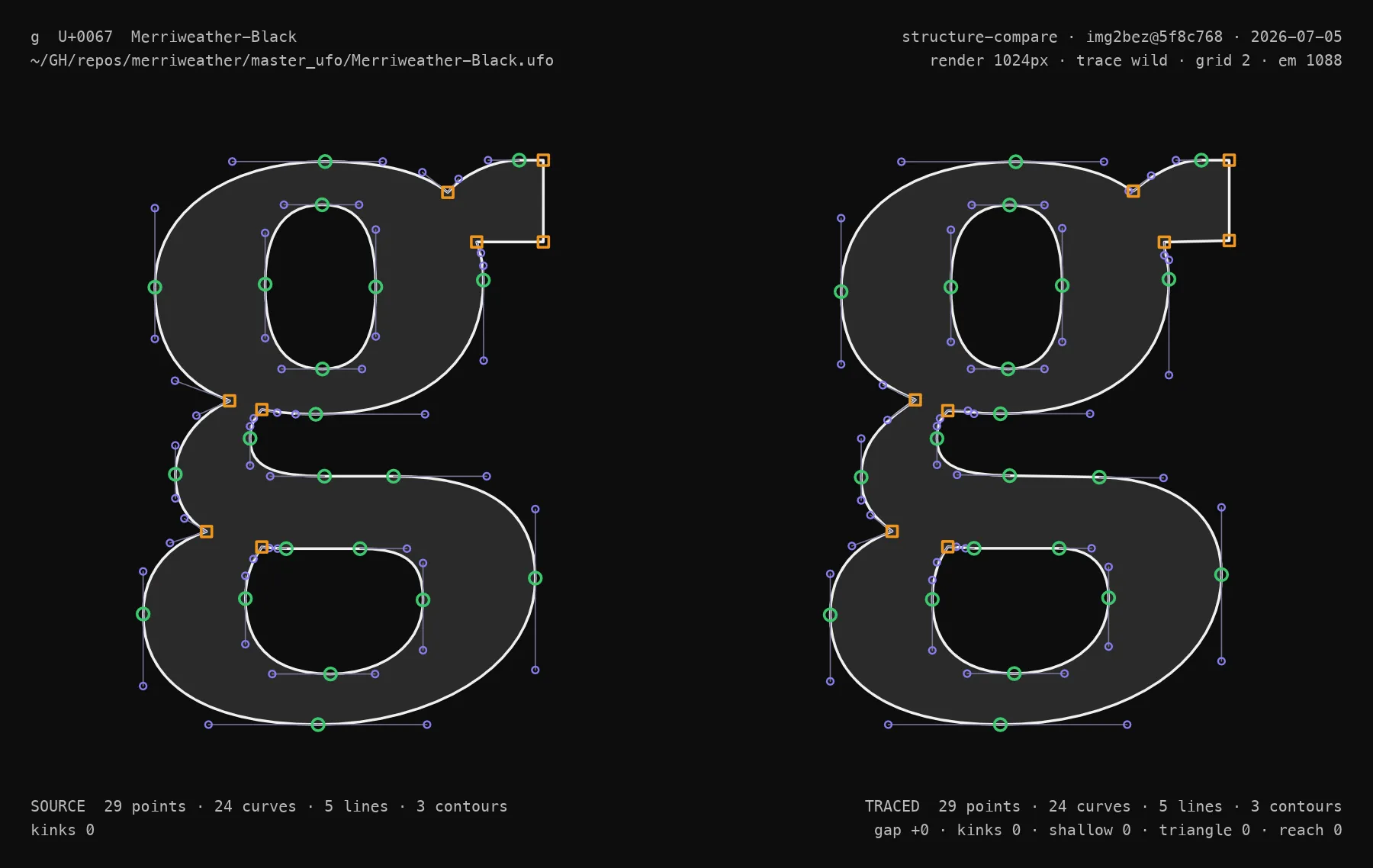
The sheets and a machine-readable summary.tsv (per-glyph point counts, plus kink, shallow-corner, and handle-geometry scans) land in ~/Desktop/structure-compare/<font>/, ranked worst-first so the biggest structural misses sit at the top.
That ranking is what makes agentic development work, and most of the recent progress came from running it in a loop. The summary is just text, so you point an AI agent at it: read the worst rows, change one thing in the tracer, re-install, re-run, and keep the change only if the structure scores improve. An agent can grind that loop overnight while you sleep. It runs against any OFL or CC0 font, or your own private synthetic data, spanning as many families and scripts (Latin, Arabic, Hebrew, etc.) as you point it at, under a hard rule that no change may improve one family by trading away another. The same eval also produced the training data for img2bez’s first shipped ML model, a tiny model that handles one structural decision too subtle for a fixed rule, described below.
10. Judging a Trace Without a Reference
The eval harness scores a trace against a known reference. At production time there is no reference, just an arbitrary image, and the question is still whether the trace is any good. img2bez answers it two ways, both reference-free:
- Reproduction: render the traced outline back to a bitmap and measure how well it covers the input’s pixels.
- Structure: regularizers that encode the type-design rules directly, like the fraction of handles leaving horizontal or vertical and a penalty for the cluster of stray points that litters an over-traced terminal.
The two have to be balanced, because the interesting failure scores well on one and badly on the other. A trace that chases every wobble in a soft scan reproduces the pixels almost perfectly with far more points than a designer would use: it wins on reproduction but loses on structure, so the combined score catches it. That combined score is the judge, and it ships in the binary and the browser; the judge value under the demo above is exactly this. A reference-free score also changes how settings get chosen: rather than predict the right preset, the tracer can try a few, judge each, and keep the best, since a deterministic trace is cheap to run.
11. How Small Is the Model?
When people hear “machine learning” next to “AI image to font” they picture something large. img2bez’s models are the opposite: small enough to count the parameters by hand, shipped as constants inside the binary rather than files loaded at runtime, a few nanoseconds per call and bit-for-bit deterministic, with no GPU and no ML runtime dependency. They are tiny decision heads, one at each pipeline gate that used to be a bare threshold: keep or drop a corner, weld a cusp or leave it, anchor a point at an inflection or not. Each is a few thousand parameters at most, and the whole set is budgeted under 100 KB. Each ships opt-in behind a flag while it is measured against the rule it might replace, and with every head off the output is byte-identical to the hand-tuned pipeline.
The first now ships: a corner keep/drop head, trained offline against real font outlines and exported as a const array of shallow trees. “The model” is a header file. You can compare it to the rule yourself, since the demo above has a Corners control that switches between them on every trace, and the structure view shows where they disagree.
The point of keeping them this small is the line it draws. The image you drop in may have come from a model with billions of parameters; the models that decide how to trace it have a few thousand. One is a probabilistic artist, the others are deterministic dispatchers that only ever decide, never draw. A network that emits curves would be stochastic and heavy, the opposite of what a tracing tool needs, so the drawing stays procedural and the learned parts only choose. They can be that small because the hard work is already done: the tracer turns pixels into clean curves on its own, and all that is left for a model is a low-dimensional nudge.
12. Early Days, and an Invitation
img2bez is early, alpha-stage software, and the ML is new: a couple of small models ship so far, each behind a flag while it proves itself against the rule it might replace. I’m also training img2bez-specific LoRAs for open-weight image models, so by the end of the summer this should be a fully open-source pipeline you can run locally on a high-end gaming GPU: generate the glyph rasters and trace them into a font source, with no cloud in the loop, fully ready to be onboarded to Google Fonts and passing all the QA requirements.
I plan to keep pushing it. I’m building a startup in AI type design, and this Rust library is the core of its data pipeline. I’m also open to working with teams who want font AI built; get in touch if that’s you.
A note on the obvious question, whether type design should be automated at all: I find it helps to remember that type design as a profession was itself created by an automation machine. The printing press displaced the manuscript scribes five hundred years ago and created a new craft in their place, and every generation of type technology since, from pantographs to phototypesetting to digital outlines, has repeated the pattern. My hope is that open tools like this one spread the new capability widely rather than concentrating it; I’ve written about that idea at more length in Diffuse Value Capture.
If you work on AI/ML engineering for vector graphics, I’d genuinely like your feedback. The repo is github.com/eliheuer/img2bez; issues and PRs are welcome, I’m on the Linebender Zulip, and this post is itself a file on GitHub, so a suggestion can come as a PR.